


Page 35 - CC2019_PS_Look_Inside
P. 35
Rasterize a Vector File

                 Logos and title treatments — such as the ones you will use in this project — are
                 commonly created as vector graphics. Although Photoshop is typically a pixel-based
                 application, you can also open and work with vector graphics created in illustration
                 programs like  Adobe Illustrator.

                  1. With cd-artwork.psd open, choose File>Open. Select HHT-logo.ai (in
                      your WIP>Music folder) and then click Open.
                      Th  is is an  Adobe Illustrator fi le of the band’s logo. When you
                      open a vector fi le (Illustrator, EPS, or PDF) in Photoshop, it is
                      rasterized or converted to a raster graphic. Th  e resulting  Import
                      PDF dialog box allows you to determine exactly what and how
                      to rasterize the fi le. (Illustrator uses  PDF as its underlying fi le
                      structure.)

                      Th  e  Crop To options determine the outside dimensions of the
                      opened fi le. Depending on how the fi le was created, some of
                      these values might be the same as others:
                         •   Bounding Box is the outermost edges of the artwork in
                           the fi le.                                                           Note:
                         •   Media Box is the size of the paper as defi ned in the fi le.
                                                                                                If you’re opening a
                         •   Crop Box is the size of the page/artboard, including printer’s marks.
                                                                                                multi-page PDF or an
                         •   Bleed Box is the trim size, plus any defi ned bleed allowance.     Illustrator fi le with more
                         •   Trim Box is the trim size as defi ned in the fi le.                than one artboard, the
                         •   Art Box is the area of the page as defi ned in the fi le.          preview window on the
                                                                                                left side of the dialog
                      Th  e Image Size fi elds default to the settings of the bounding box you select. You can   box shows thumbnails of
                      change the size, resolution, color mode, and bit depth by entering new values. You can   each “page” in the fi le.
                      check the  Constrain Proportions option to keep the height and width proportional to   You can click a specifi c
                      the original dimensions.
                                                                                                thumbnail to select any-
                  2.  Make sure Bounding Box is selected in the Crop To fi eld, and the         thing other than Page 1.
                      Resolution fi eld is set to 300 pixels/inch.                              Press Shift and click to
                                                                                                select multiple con-
                  3.  Click OK.                                                                 secutive pages, or press
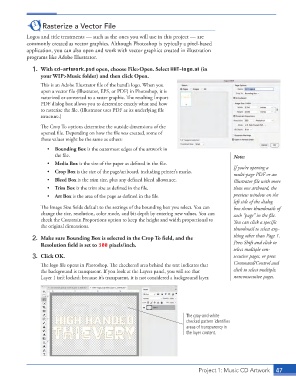
                      Th  e logo fi le opens in Photoshop. Th  e checkered area behind the text indicates that   Command/Control and
                      the background is transparent. If you look at the Layers panel, you will see that   click to select multiple,
                      Layer 1 isn’t locked; because it’s transparent, it is not considered a  background layer.  nonconsecutive pages.


                                                                              The gray-and-white
                                                                              checked pattern identifies
                                                                              areas of transparency in
                                                                              the layer content.


                                                                                    Project 1: Music CD Artwork  47

