


Page 63 - CS6_ID_Look_Inside
P. 63
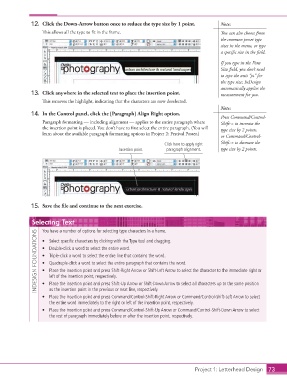
12.  Click the Down-Arrow button once to reduce the type size by 1 point.     Note:
                        This allows all the type to fit in the frame.                            You can also choose from
                                                                                                 the common preset type
                                                                                                 sizes in the menu, or type
                                                                                                 a specific size in the field.

                                                                                                 If you type in the Font
                                                                                                 Size field, you don’t need
                                                                                                 to type the unit “pt” for
                                                                                                 the type size; InDesign
                                                                                                 automatically applies the
                   13.  Click anywhere in the selected text to place the insertion point.        measurement for you.
                        This removes the highlight, indicating that the characters are now deselected.
                                                                                                 Note:
                   14.  In the Control panel, click the [Paragraph] Align Right option.
                                                                                                 Press Command/Control-
                        Paragraph formatting — including alignment — applies to the entire paragraph where   Shift-> to increase the
                        the insertion point is placed. You don’t have to first select the entire paragraph. (You will   type size by 2 points,
                        learn about the available paragraph formatting options in Project 2: Festival Poster.)
                                                                                                 or Command/Control-
                                                                          Click here to apply right   Shift-< to decrease the
                                                       Insertion point     paragraph alignment.  type size by 2 points.


                   15.  Save the file and continue to the next exercise.


                    Selecting Text

                        You have a number of options for selecting type characters in a frame.
                     INDESIGN FOUNDATIONS  •  Double-click a word to select the entire word.
                        •  Select specific characters by clicking with the Type tool and dragging.


                        •  Triple-click a word to select the entire line that contains the word.
                        •  Quadruple-click a word to select the entire paragraph that contains the word.
                        •  Place the insertion point and press Shift-Right Arrow or Shift-Left Arrow to select the character to the immediate right or
                           left of the insertion point, respectively.
                        •  Place the insertion point and press Shift-Up Arrow or Shift-Down Arrow to select all characters up to the same position
                           as the insertion point in the previous or next line, respectively.
                        •  Place the insertion point and press Command/Control-Shift-Right Arrow or Command/Control-Shift-Left Arrow to select
                           the entire word immediately to the right or left of the insertion point, respectively.
                        •  Place the insertion point and press Command/Control-Shift-Up Arrow or Command/Control-Shift-Down Arrow to select
                           the rest of paragraph immediately before or after the insertion point, respectively.


                                                                                      Project 1: Letterhead Design  73

