


Page 62 - CS6_ID_Look_Inside
P. 62
10.  Macintosh: With the text still selected, open the Font menu in the Control
                    panel and choose ATC Oak>Italic.
                    Different styles of the same font appear as submenus to the main font list; the primary
                    font is listed in the menu, and variations are listed in the attached submenu.


                                                                                             Note:
                                                                                             There are three primary
                                                                                             types of fonts:
                                                                                             PostScript (Type 1)
                                                                                             fonts have two file
                                                                                             components (outline and
                    Windows: Open the Font Family menu and choose ATC Oak, and then          printer) that must both
                    open the Font Style menu and choose Italic.                              be available for output.
                    Windows does not display different font styles in submenus. You have to choose the font   TrueType fonts have
                    first, and then use the secondary menu to choose the appropriate style.  a single file, but (until
                                                                                             recently) were primarily
                                                                                             used on the Windows
                                                                                             platform.

                                                                                             OpenType fonts are
                                                                                             contained in a single file
                                                                                             that can include more
                                                                                             than 60,000 glyphs
                                                                                             (characters) in a single
                                                                                             font. OpenType fonts are
                                                                                             cross-platform; the same
                                                                                             font file can be used on
                11.  Click the Up-Arrow button for the Font Size field until you see a red icon on   both Macintosh and
                    the right edge of the frame.                                             Windows systems.
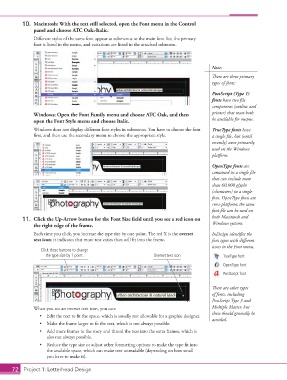
                    Each time you click, you increase the type size by one point. The red X is the overset   InDesign identifies the
                    text icon; it indicates that more text exists than will fit into the frame.  font types with different
                                                                                             icons in the Font menu.
                       Click these buttons to change
                         the type size by 1 point.                   Overset text icon            TrueType font
                                                                                                  OpenType font

                                                                                                  PostScript font

                                                                                             There are other types
                                                                                             of fonts, including
                                                                                             PostScript Type 3 and

                    When you see an overset text icon, you can:                              Multiple Master, but
                       •  Edit the text to fit the space, which is usually not allowable for a graphic designer.  these should generally be
                                                                                             avoided.
                       •  Make the frame larger to fit the text, which is not always possible.
                       •  Add more frames to the story and thread the text into the extra frames, which is
                          also not always possible.
                       •  Reduce the type size or adjust other formatting options to make the type fit into
                          the available space, which can make text unreadable (depending on how small
                          you have to make it).

           72 Project 1: Letterhead Design

