


Page 36 - CC 2019 ID Look Inside
P. 36
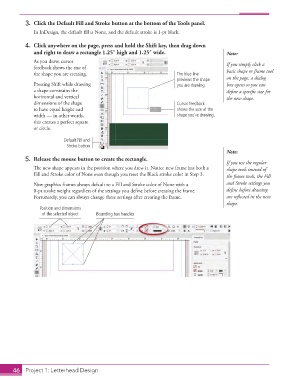
3.  Click the  Default Fill and Stroke button at the bottom of the  Tools panel.
                   In InDesign, the default  fi ll is None, and the default  stroke is 1-pt black.

               4.  Click anywhere on the page, press and hold the Shift key, then drag down
                   and right to draw a rectangle 1.25″ high and 1.25″ wide.                  Note:
                   As you draw,   cursor                                                     If you simply click a
                   feedback shows the size of
                   the shape you are creating.                            The blue line      basic shape or frame tool
                                                                          previews the shape   on the page, a dialog
                   Pressing Shift while drawing                           you are drawing.   box opens so you can
                   a shape constrains the                                                    defi ne a specifi c size for
                   horizontal and vertical                                                   the new shape.
                   dimensions of the shape                                Cursor feedback
                   to have equal height and                               shows the size of the
                   width — in other words,                                shape you’re drawing.
                   this creates a perfect square
                   or circle.

                               Default Fill and
                                Stroke button
                                                                                             Note:
               5.  Release the mouse button to create the rectangle.
                                                                                             If you use the regular
                   Th  e new shape appears in the position where you drew it. Notice new frame has both a   shape tools instead of
                   Fill and Stroke color of None even though you reset the Black stroke color in Step 3.  the frame tools, the Fill

                   New graphics frames always default to a Fill and Stroke color of None with a   and Stroke settings you
                   0-pt stroke weight regardless of the settings you defi ne before creating the frame.   defi ne before drawing
                   Fortunately, you can always change these settings after creating the frame.  are refl ected in the new
                                                                                             shape.
                      Position and dimensions
                      of the selected object  Bounding box handles


           46     Project 1: Letterhead Design

