


Page 59 - CC2017_ID_Look_Inside
P. 59
Selecting Text                                    •  Place the insertion point and press Shift-Up Arrow or
                   You have a number of options for selecting type characters in a frame.
                 INDESIGN FOUNDATIONS  •  Double-click a word to select the entire word.  •  Place the insertion point and press Command/Control-
                   •  Select specific characters by clicking with the Type tool
                      and dragging.
                                                                    Shift-Down Arrow to select all characters up to the same
                                                                    position as the insertion point in the previous or next
                                                                    line, respectively.
                   •  Triple-click a word to select the entire line that contains
                      the word.
                                                                    Shift-Right Arrow or Command/Control-Shift-Left Arrow
                   •  Quadruple-click a word to select the entire paragraph
                                                                    to select the entire word immediately to the right or left
                      that contains the word.
                                                                    of the insertion point, respectively.
                   •  Place the insertion point and press Shift-Right Arrow or
                      Shift-Left Arrow to select the character to the immediate   •  Place the insertion point and press Command/Control-
                                                                    Shift-Up Arrow or Command/Control-Shift-Down Arrow
                      right or left of the insertion point, respectively.
                                                                    to select the rest of paragraph immediately before or
                                                                    after the insertion point, respectively.


                8.  Choose Edit>Select All to select all of the text in the frame.
                   Character formatting such as the font, style, and size apply only to selected characters.

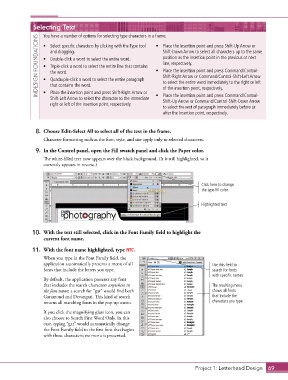
                9.  In the Control panel, open the Fill swatch panel and click the Paper color.
                   The white-filled text now appears over the black background. (It is still highlighted, so it
                   currently appears in reverse.)


                                                                                    Click here to change
                                                                                    the type fill color.


                                                                                    Highlighted text


               10.  With the text still selected, click in the Font Family field to highlight the
                   current font name.

               11.  With the font name highlighted, type ATC.
                   When you type in the Font Family field, the
                   application automatically presents a menu of all                      Use this field to
                   fonts that include the letters you type.                              search for fonts
                                                                                         with specific names.
                   By default, the application presents any font
                   that includes the search characters anywhere in                       The resulting menu
                   the font name; a search for “gar” would find both                     shows all fonts
                   Garamond and Devangari. This kind of search                           that include the
                   returns all matching fonts in the pop-up menu.                        characters you type.

                   If you click the magnifying glass icon, you can
                   also choose to Search First Word Only. In this
                   case, typing “gar” would automatically change
                   the Font Family field to the first font that begins
                   with those characters; no menu is presented.


                                                                                  Project 1: Letterhead Design  69

