


Page 56 - CC2017_ID_Look_Inside
P. 56
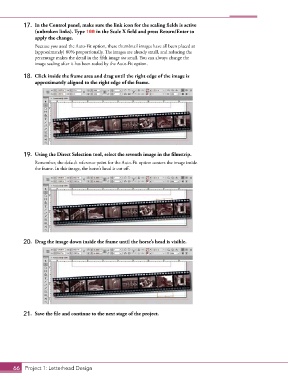
17.  In the Control panel, make sure the link icon for the scaling fields is active
               (unbroken links). Type 100 in the Scale X field and press Return/Enter to
               apply the change.
               Because you used the Auto-Fit option, these thumbnail images have all been placed at
               (approximately) 80% proportionally. The images are already small, and reducing the
               percentage makes the detail in the fifth image too small. You can always change the
               image scaling after it has been scaled by the Auto-Fit option.

           18.  Click inside the frame area and drag until the right edge of the image is
               approximately aligned to the right edge of the frame.


           19.  Using the Direct Selection tool, select the seventh image in the filmstrip.
               Remember, the default reference point for the Auto-Fit option centers the image inside
               the frame. In this image, the horse’s head is cut off.


           20.  Drag the image down inside the frame until the horse’s head is visible.


           21.  Save the file and continue to the next stage of the project.


       66 Project 1: Letterhead Design

