


Page 63 - CC2017_ID_Look_Inside
P. 63
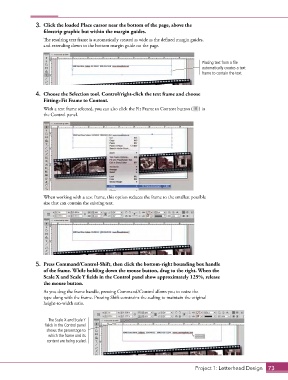
3.  Click the loaded Place cursor near the bottom of the page, above the
                   filmstrip graphic but within the margin guides.

                   The resulting text frame is automatically created as wide as the defined margin guides,
                   and extending down to the bottom margin guide on the page.


                                                                                    Placing text from a file
                                                                                    automatically creates a text
                                                                                    frame to contain the text.


                4.  Choose the Selection tool. Control/right-click the text frame and choose
                   Fitting>Fit Frame to Content.
                   With a text frame selected, you can also click the Fit Frame to Content button (  ) in
                   the Control panel.


                   When working with a text frame, this option reduces the frame to the smallest possible
                   size that can contain the existing text.


                5.  Press Command/Control-Shift, then click the bottom-right bounding box handle
                   of the frame. While holding down the mouse button, drag to the right. When the
                   Scale X and Scale Y fields in the Control panel show approximately 125%, release
                   the mouse button.
                   As you drag the frame handle, pressing Command/Control allows you to resize the
                   type along with the frame. Pressing Shift constrains the scaling to maintain the original
                   height-to-width ratio.


                     The Scale X and Scale Y
                   fields in the Control panel
                    shows the percentage to
                     which the frame and its
                    content are being scaled.


                                                                                  Project 1: Letterhead Design  73

