


Page 62 - CC2017_ID_Look_Inside
P. 62
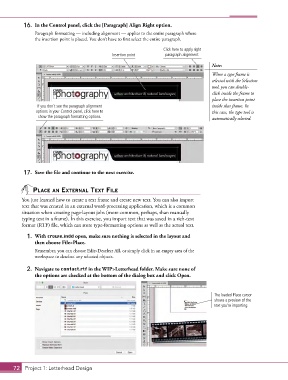
16.  In the Control panel, click the [Paragraph] Align Right option.
               Paragraph formatting — including alignment — applies to the entire paragraph where
               the insertion point is placed. You don’t have to first select the entire paragraph.

                                                                    Click here to apply right
                                               Insertion point       paragraph alignment.

                                                                                        Note:
                                                                                        When a type frame is
                                                                                        selected with the Selection
                                                                                        tool, you can double-
                                                                                        click inside the frame to
                                                                                        place the insertion point
                If you don’t see the paragraph alignment                                inside that frame. In
                options in your Control panel, click here to                            this case, the type tool is
                 show the paragraph formatting options.                                 automatically selected.


           17.  Save the file and continue to the next exercise.


               PlACe An externAl text File

          You just learned how to create a text frame and create new text. You can also import
          text that was created in an external word-processing application, which is a common
          situation when creating page-layout jobs (more common, perhaps, than manually
          typing text in a frame). In this exercise, you import text that was saved in a rich-text
          format (RTF) file, which can store type-formatting options as well as the actual text.

            1.  With crowe.indd open, make sure nothing is selected in the layout and
               then choose File>Place.
               Remember, you can choose Edit>Deselect All, or simply click in an empty area of the
               workspace to deselect any selected objects.

            2.  Navigate to contact.rtf in the WIP>Letterhead folder. Make sure none of
               the options are checked at the bottom of the dialog box and click Open.


                                                                                         The loaded Place cursor
                                                                                         shows a preview of the
                                                                                         text you’re importing.


       72 Project 1: Letterhead Design

