


Page 18 - CC2017_ID_Look_Inside
P. 18
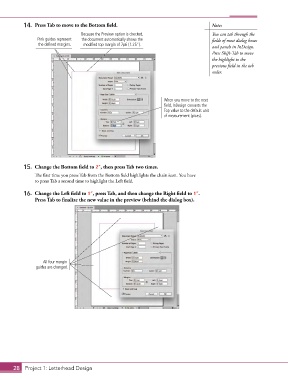
14.  Press Tab to move to the Bottom field.                                  Note:
                                   Because the Preview option is checked,               You can tab through the
                 Pink guides represent   the document automatically shows the           fields of most dialog boxes
                 the defined margins.  modified top margin of 7p6 (1.25”).              and panels in InDesign.
                                                                                        Press Shift-Tab to move
                                                                                        the highlight to the
                                                                                        previous field in the tab
                                                                                        order.


                                                                     When you move to the next
                                                                     field, InDesign converts the
                                                                     Top value to the default unit
                                                                     of measurement (picas).


           15.  Change the Bottom field to 2”, then press Tab two times.
               The first time you press Tab from the Bottom field highlights the chain icon. You have
               to press Tab a second time to highlight the Left field.

           16.  Change the Left field to 1”, press Tab, and then change the Right field to 1”.
               Press Tab to finalize the new value in the preview (behind the dialog box).


                   All four margin
                guides are changed.


       28 Project 1: Letterhead Design

