


Page 61 - Adobe Indesign CC 2020
P. 61
More about Working with Fonts (continued)

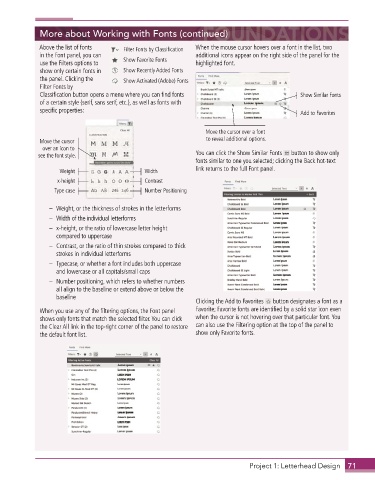
             Above the list of fonts    Filter Fonts by Classification  When the mouse cursor hovers over a font in the list, two
             in the Font panel, you can                      additional icons appear on the right side of the panel for the
             use the Filters options to   Show Favorite Fonts  highlighted font .
             show only certain fonts in   Show Recently Added Fonts
             the panel . Clicking the   Show Activated (Adobe) Fonts
             Filter Fonts by
             Classification button opens a menu where you can find fonts                     Show Similar Fonts
             of a certain style (serif, sans serif, etc .), as well as fonts with
             specific properties:                                                            Add to Favorites


                                                                Move the cursor over a font
             Move the cursor                                    to reveal additional options.
              over an icon to
             see the font style.                             You can click the Show Similar Fonts   button to show only
                                                             fonts similar to one you selected; clicking the Back hot-text
                   Weight                    Width           link returns to the full Font panel .
                   x-height                  Contrast
                  Type case                  Number Positioning

                –   Weight, or the thickness of strokes in the letterforms
                –   Width of the individual letterforms
                –   x-height, or the ratio of lowercase letter height
                  compared to uppercase
                –    Contrast, or the ratio of thin strokes compared to thick
                  strokes in individual letterforms
                –    Typecase, or whether a font includes both uppercase
                  and lowercase or all capitals/small caps
                –    Number positioning, which refers to whether numbers
                  all align to the baseline or extend above or below the
                  baseline
                                                             Clicking the Add to Favorites   button designates a font as a
             When you use any of the filtering options, the Font panel   Favorite; Favorite fonts are identified by a solid star icon even
             shows only fonts that match the selected filter . You can click   when the cursor is not hovering over that particular font . You
             the Clear All link in the top-right corner of the panel to restore   can also use the Filtering option at the top of the panel to
             the default font list .                         show only Favorite fonts .


                                                                             Project 1: Letterhead Design  71

