


Page 56 - Adobe Indesign CC 2020
P. 56
STAGE 4 / Creating and Formatting Basic Text

         InDesign is ultimately a page-layout application; page layout means combining text and graphic
         elements in a meaningful way to convey a message. Text can be a single word (as in the logo used in
         this project) or thousands of pages of consecutive copy (as in a dictionary). Virtually every project
         you build in InDesign will involve text in one way or another; this letterhead is no exception.


               Create a Simple Text Frame
         Adding text to a page is a relatively simple process: draw a frame, and then type.    Note:
         In this exercise, you’ll create a new text frame and add the client’s tag line, then apply
         some basic formatting options to style the text.                               Remember from the
             Keep in mind this project is an introduction to creating elements on a layout   Getting Started section
         page; there is far more to professional typesetting than the few options you use here.   at the beginning of this
         InDesign provides extremely precise control over virtually every aspect of every   book: to complete the
         letter and word on the page. In the following projects, you will learn about the vast   projects in this book,
         number of options available for setting and controlling type, from formatting a   you should install and
         single paragraph to an entire multi-page booklet.                              activate the ATC fonts
                                                                                        provided with the book’s
           1.  With gcm-letterhead.indd open, select the Type tool in the Tools panel.   resource files.

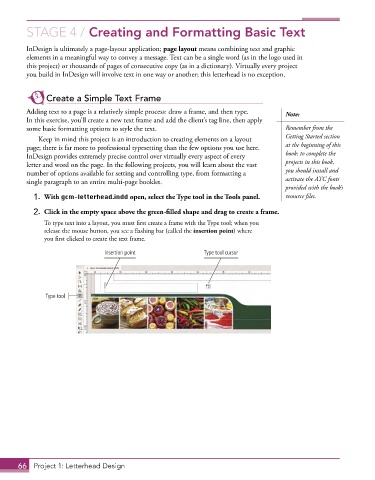
           2.  Click in the empty space above the green-filled shape and drag to create a frame.
               To type text into a layout, you must first create a frame with the Type tool; when you
               release the mouse button, you see a flashing bar (called the insertion point) where
               you first clicked to create the text frame.
                                 Insertion point               Type tool cursor


               Type tool


       66  Project 1: Letterhead Design

