


Page 60 - Adobe Indesign CC 2020
P. 60
More about Working with Fonts

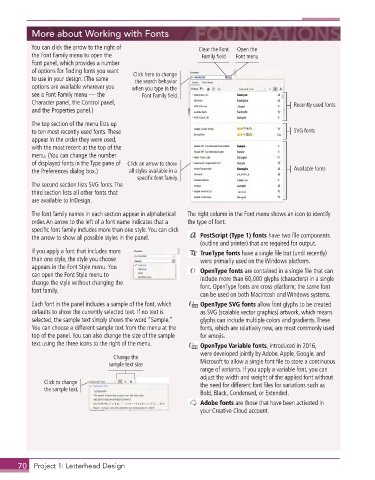
           You can click the arrow to the right of            Clear the Font   Open the
           the Font Family menu to open the                    Family field  Font menu
           Font panel, which provides a number
           of options for finding fonts you want   Click here to change
           to use in your design . (The same   the search behavior
           options are available wherever you   when you type in the
           see a Font Family menu — the     Font Family field.
           Character panel, the Control panel,                                             Recently used fonts
           and the Properties panel .)

           The top section of the menu lists up
           to ten most recently used fonts . These                                         SVG fonts
           appear in the order they were used,
           with the most recent at the top of the
           menu . (You can change the number
           of displayed fonts in the Type pane of  Click an arrow to show
           the Preferences dialog box .)   all styles available in a                       Available fonts
                                           specific font family.
           The second section lists SVG fonts . The
           third section lists all other fonts that
           are available to InDesign .

           The font family names in each section appear in alphabetical   The right column in the Font menu shows an icon to identify
           order . An arrow to the left of a font name indicates that a   the type of font:
           specific font family includes more than one style . You can click
           the arrow to show all possible styles in the panel .   PostScript (Type 1) fonts have two file components
                                                              (outline and printer) that are required for output .
           If you apply a font that includes more              TrueType fonts have a single file but (until recently)
           than one style, the style you choose               were primarily used on the Windows platform .
           appears in the Font Style menu . You                OpenType fonts are contained in a single file that can
           can open the Font Style menu to                    include more than 60,000 glyphs (characters) in a single
           change the style without changing the              font . OpenType fonts are cross-platform; the same font
           font family .
                                                              can be used on both Macintosh and Windows systems .
           Each font in the panel includes a sample of the font, which    OpenType SVG fonts allow font glyphs to be created
           defaults to show the currently selected text . If no text is   as SVG (scalable vector graphics) artwork, which means
           selected, the sample text simply shows the word “Sample .”   glyphs can include multiple colors and gradients . These
           You can choose a different sample text from the menu at the   fonts, which are relatively new, are most commonly used
           top of the panel . You can also change the size of the sample   for emojis .
           text using the three icons to the right of the menu .   OpenType Variable fonts, introduced in 2016,
                                                              were developed jointly by Adobe, Apple, Google, and
                                    Change the
                                  sample text size            Microsoft to allow a single font file to store a continuous
                                                              range of variants . If you apply a variable font, you can
                                                              adjust the width and weight of the applied font without
               Click to change                                the need for different font files for variations such as
               the sample text.
                                                              Bold, Black, Condensed, or Extended .
                                                               Adobe fonts are those that have been activated in
                                                              your Creative Cloud account .


       70  Project 1: Letterhead Design

