


Page 66 - Adobe Indesign CC 2020
P. 66
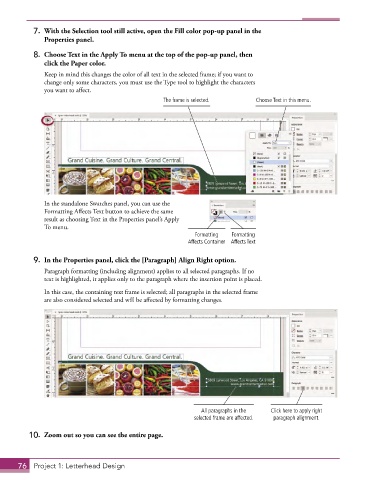
7.  With the Selection tool still active, open the Fill color pop-up panel in the
              Properties panel.

           8.  Choose Text in the Apply To menu at the top of the pop-up panel, then
              click the Paper color.
               Keep in mind this changes the color of all text in the selected frame; if you want to
               change only some characters, you must use the Type tool to highlight the characters
               you want to affect.
                                                   The frame is selected.      Choose Text in this menu.


               In the standalone Swatches panel, you can use the
               Formatting Affects Text button to achieve the same
               result as choosing Text in the Properties panel’s Apply
               To menu.
                                                             Formatting   Formatting
                                                          Affects Container Affects Text


           9.  In the Properties panel, click the [Paragraph] Align Right option.
               Paragraph formatting (including alignment) applies to all selected paragraphs. If no
               text is highlighted, it applies only to the paragraph where the insertion point is placed.

               In this case, the containing text frame is selected; all paragraphs in the selected frame
               are also considered selected and will be affected by formatting changes.


                                                              All paragraphs in the   Click here to apply right
                                                            selected frame are affected.  paragraph alignment.

          10.  Zoom out so you can see the entire page.


       76  Project 1: Letterhead Design

