


Page 64 - Adobe Indesign CC 2020
P. 64
Place an External Text File
         You just learned how to create a text frame and create new text. You can also import
         text created in an external word-processing application, which is a common situation
         when creating page-layout jobs (more common, perhaps, than manually typing text
         in a frame). In this exercise, you import text saved in a rich-text format (RTF) file,
         which can store type-formatting options as well as the actual text.

           1.  With gcm-letterhead.indd open, make sure nothing is selected in the
              layout and then choose File>Place.

               Remember, you can choose Edit>Deselect All, or simply click in an empty area of the
               workspace to deselect any selected objects.

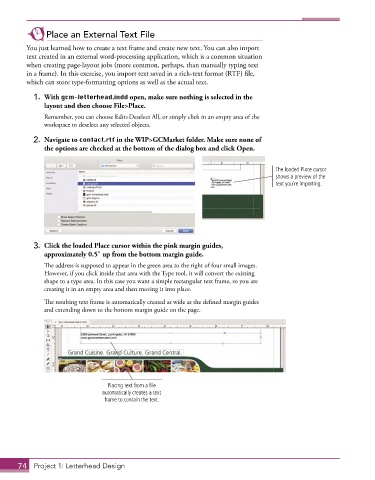
           2.  Navigate to contact.rtf in the WIP>GCMarket folder. Make sure none of
              the options are checked at the bottom of the dialog box and click Open.


                                                                                     The loaded Place cursor
                                                                                     shows a preview of the
                                                                                     text you’re importing.


           3.  Click the loaded Place cursor within the pink margin guides,
              approximately 0.5″ up from the bottom margin guide.
               The address is supposed to appear in the green area to the right of four small images.
               However, if you click inside that area with the Type tool, it will convert the existing
               shape to a type area. In this case you want a simple rectangular text frame, so you are
               creating it in an empty area and then moving it into place.

               The resulting text frame is automatically created as wide as the defined margin guides
               and extending down to the bottom margin guide on the page.


                                  Placing text from a file
                                automatically creates a text
                                 frame to contain the text.


       74  Project 1: Letterhead Design

