


Page 40 - CS6_DW_Look_Inside
P. 40
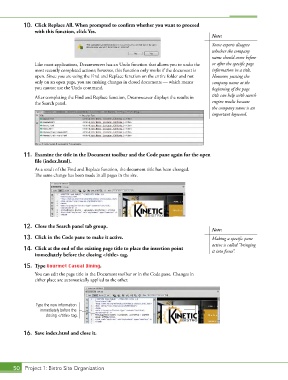
10.  Click Replace All. When prompted to confirm whether you want to proceed
               with this function, click Yes.
                                                                                        Note:

                                                                                        Some experts disagree
                                                                                        whether the company
                                                                                        name should come before
               Like most applications, Dreamweaver has an Undo function that allows you to undo the   or after the specific page
               most recently completed actions; however, this function only works if the document is   information in a title.
               open. Since you are using the Find and Replace function on the entire folder and not   However, putting the
               only on an open page, you are making changes in closed documents — which means   company name at the
               you cannot use the Undo command.                                         beginning of the page
               After completing the Find and Replace function, Dreamweaver displays the results in   title can help with search
               the Search panel.                                                        engine results because
                                                                                        the company name is an
                                                                                        important keyword.


           11.  Examine the title in the Document toolbar and the Code pane again for the open
               file (index.html).
               As a result of the Find and Replace function, the document title has been changed.
               The same change has been made in all pages in the site.


           12.  Close the Search panel tab group.
                                                                                        Note:
           13.  Click in the Code pane to make it active.                               Making a specific pane
                                                                                        active is called “bringing
           14.  Click at the end of the existing page title to place the insertion point   it into focus”.
               immediately before the closing </title> tag.

           15.  Type Gourmet Casual Dining.
               You can edit the page title in the Document toolbar or in the Code pane. Changes in
               either place are automatically applied to the other.


                Type the new information                                           Text
                  immediately before the                                           Here
                    closing </title> tag.


           16.  Save index.html and close it.


       50 Project 1: Bistro Site Organization

