


Page 37 - Adobe Dream Viewer 2021
P. 37
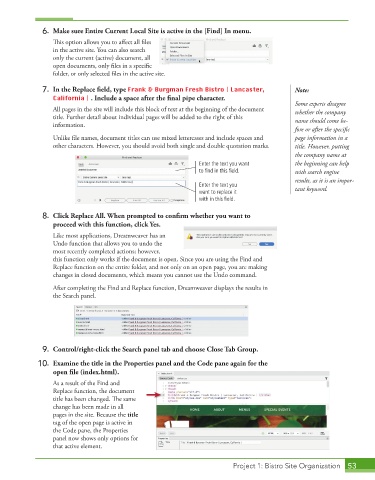
6.  Make sure Entire Current Local Site is active in the [Find] In menu.

                 This option allows you to affect all files


                 in the active site. You can also search
                 only the current (active) document, all

                 open documents, only files in a specific


                 folder, or only selected files in the active site.
             7.  In the Replace fi eld, type Frank & Burgman Fresh Bistro | Lancaster,     Note:
                 California | . Include a space after the fi nal pipe character.
                                                                                           Some experts disagree
                 All pages in the site will include this block of text at the beginning of the document   whether the company
                 title. Further detail about individual pages will be added to the right of this   name should come be-
                 information.

                                                                                           fore or after the specific
                 Unlike file names, document titles can use mixed lettercases and include spaces and   page information in a

                 other characters. However, you should avoid both single and double quotation marks.  title. However, putting
                                                                                           the company name at
                                                              Enter the text you want      the beginning can help
                                                              to find in this field.       with search engine
                                                                                           results, as it is an impor-
                                                              Enter the text you
                                                              want to replace it           tant keyword.
                                                              with in this field.

             8.  Click Replace All. When prompted to confi rm whether you want to
                 proceed with this function, click Yes.
                 Like most applications, Dreamweaver has an
                 Undo function that allows you to undo the
                 most recently completed actions; however,
                 this function only works if the document is open. Since you are using the Find and
                 Replace function on the entire folder, and not only on an open page, you are making
                 changes in closed documents, which means you cannot use the Undo command.
                 After completing the Find and Replace function, Dreamweaver displays the results in
                 the Search panel.


             9.  Control/right-click the Search panel tab and choose Close Tab Group.
             10.  Examine the title in the Properties panel and the Code pane again for the

                 open file (index.html).
                 As a result of the Find and
                 Replace function, the document

                 title has been changed. The same
                 change has been made in all
                 pages in the site. Because the title
                 tag of the open page is active in
                 the Code pane, the Properties
                 panel now shows only options for
                 that active element.


                                                                        Project 1: Bistro Site Organization  53

