


Page 32 - Adobe Dream Viewer 2021
P. 32
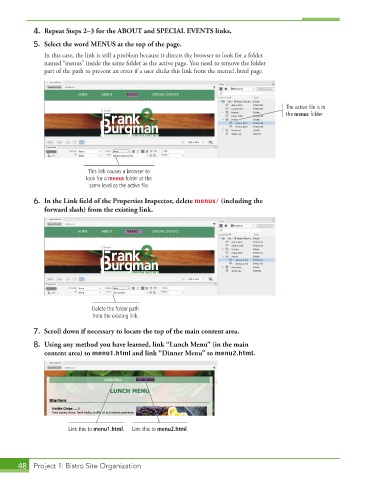
4.  Repeat Steps 2–3 for the ABOUT and SPECIAL EVENTS links.

           5.  Select the word MENUS at the top of the page.
               In this case, the link is still a problem because it directs the browser to look for a folder
               named “menus” inside the same folder as the active page. You need to remove the folder
               part of the path to prevent an error if a user clicks this link from the menu1.html page.


                                                                                        The active file is in
                                                                                        the menus folder.


                            This link causes a browser to
                           look for a menus folder at the
                            same level as the active file.
           6.  In the Link field of the Properties Inspector, delete menus/ (including the
              forward slash) from the existing link.


                             Delete the folder path
                             from the existing link.
           7.  Scroll down if necessary to locate the top of the main content area.

           8.  Using any method you have learned, link “Lunch Menu” (in the main
              content area) to menu1.html and link “Dinner Menu” to menu2.html.


                      Link this to menu1.html.  Link this to menu2.html.


       48  Project 1: Bistro Site Organization

