


Page 41 - Adobe Dream Viewer 2021
P. 41
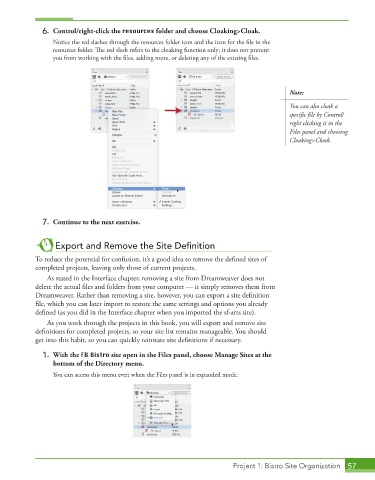
6.  Control/right-click the resources folder and choose Cloaking>Cloak.

                 Notice the red slashes through the resources folder icon and the icon for the file in the

                 resources folder. The red slash refers to the cloaking function only; it does not prevent
                 you from working with the files, adding more, or deleting any of the existing files.


                                                                                         Note:
                                                                                         You can also cloak a


                                                                                         specific file by Control/
                                                                                         right clicking it in the
                                                                                         Files panel and choosing
                                                                                         Cloaking>Cloak.


             7.  Continue to the next exercise.


                  Export and Remove the Site Defi nition

            To reduce the potential for confusion, it’s a good idea to remove the defined sites of
            completed projects, leaving only those of current projects.
               As stated in the Interface chapter, removing a site from Dreamweaver does not
            delete the actual files and folders from your computer — it simply removes them from


            Dreamweaver. Rather than removing a site, however, you can export a site definition

            file, which you can later import to restore the same settings and options you already
            defi ned (as you did in the Interface chapter when you imported the sf-arts site).
               As you work through the projects in this book, you will export and remove site
            definitions for completed projects, so your site list remains manageable. You should

            get into this habit, so you can quickly reinstate site definitions if necessary.

             1.  With the FB Bistro site open in the Files panel, choose Manage Sites at the
                 bottom of the Directory menu.

                 You can access this menu even when the Files panel is in expanded mode.


                                                                        Project 1: Bistro Site Organization  57

