


Page 33 - Adobe Dream Viewer 2021
P. 33
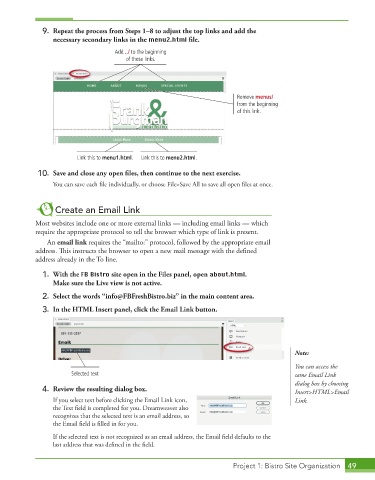
9.  Repeat the process from Steps 1–8 to adjust the top links and add the
                 necessary secondary links in the menu2.html fi le.
                                    Add ../ to the beginning
                                       of these links.


                                                                         Remove menus/
                                                                         from the beginning
                                                                         of this link.


                         Link this to menu1.html.  Link this to menu2.html.

             10.  Save and close any open fi les, then continue to the next exercise.
                 You can save each file individually, or choose File>Save All to save all open files at once.


                  Create an Email Link

            Most websites include one or more external links — including email links — which
            require the appropriate protocol to tell the browser which type of link is present.
               An email link requires the “mailto:” protocol, followed by the appropriate email
            address. This instructs the browser to open a new mail message with the defined


            address already in the To line.
             1.  With the FB Bistro site open in the Files panel, open about.html.
                 Make sure the Live view is not active.

             2.  Select the words “[email protected]” in the main content area.
             3.  In the HTML Insert panel, click the Email Link button.


                                                                                           Note:

                                                                                           You can access the
                       Selected text                                                       same Email Link
                                                                                           dialog box by choosing
             4.  Review the resulting dialog box.                                          Insert>HTML>Email
                 If you select text before clicking the Email Link icon,                   Link.
                 the Text field is completed for you. Dreamweaver also

                 recognizes that the selected text is an email address, so
                 the Email field is filled in for you.


                 If the selected text is not recognized as an email address, the Email field defaults to the
                 last address that was defined in the field.


                                                                        Project 1: Bistro Site Organization  49

