


Page 30 - Adobe Dream Viewer 2021
P. 30
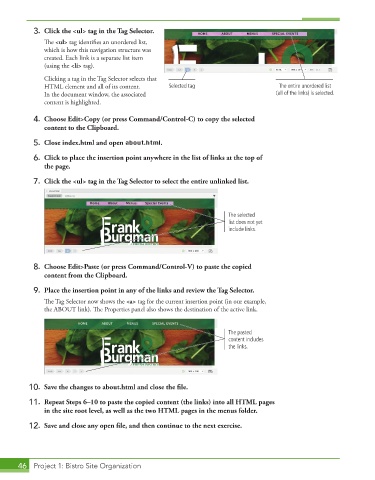
3.  Click the <ul> tag in the Tag Selector.
               The <ul> tag identifies an unordered list,
               which is how this navigation structure was
               created. Each link is a separate list item
               (using the <li> tag).
               Clicking a tag in the Tag Selector selects that
              HTML element and all of its content.    Selected tag                    The entire unordered list
              In the document window, the associated                                 (all of the links) is selected.
              content is highlighted.

           4.  Choose Edit>Copy (or press Command/Control-C) to copy the selected
              content to the Clipboard.
           5.  Close index.html and open about.html.

           6.  Click to place the insertion point anywhere in the list of links at the top of
              the page.

           7.  Click the <ul> tag in the Tag Selector to select the entire unlinked list.


                                                                       The selected
                                                                       list does not yet
                                                                       include links.


           8.  Choose Edit>Paste (or press Command/Control-V) to paste the copied
              content from the Clipboard.
           9.  Place the insertion point in any of the links and review the Tag Selector.

               The Tag Selector now shows the <a> tag for the current insertion point (in our example,
               the ABOUT link). The Properties panel also shows the destination of the active link.


                                                                       The pasted
                                                                       content includes
                                                                       the links.


          10.  Save the changes to about.html and close the file.

          11.  Repeat Steps 6–10 to paste the copied content (the links) into all HTML pages
              in the site root level, as well as the two HTML pages in the menus folder.

          12.  Save and close any open file, and then continue to the next exercise.


       46  Project 1: Bistro Site Organization

