


Page 83 - Adobe Photoshop and Dreamviewer 2021
P. 83
PROJECT SUMMARY


            Making selections is one of the most basic — and most important — skills that you will learn in
            Photoshop. Selections are so important that Photoshop dedicates an entire menu to the process.
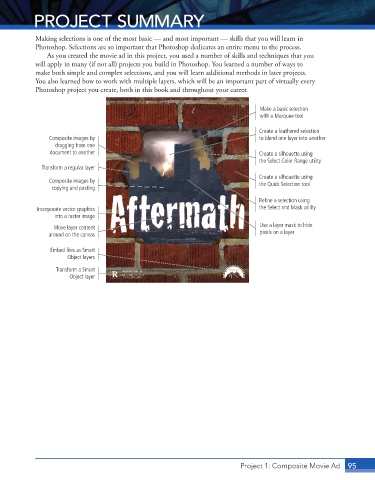
               As you created the movie ad in this project, you used a number of skills and techniques that you
            will apply in many (if not all) projects you build in Photoshop. You learned a number of ways to
            make both simple and complex selections, and you will learn additional methods in later projects.
            You also learned how to work with multiple layers, which will be an important part of virtually every
            Photoshop project you create, both in this book and throughout your career.


                                                                                Make a basic selection
                                                                                with a Marquee tool

                                                                                Create a feathered selection
                Composite images by                                             to blend one layer into another
                  dragging from one
                document to another                                             Create a silhouette using
                                                                                the Select Color Range utility
              Transform a regular layer
                                                                                Create a silhouette using
                Composite images by                                             the Quick Selection tool
                 copying and pasting

                                                                                Refine a selection using
            Incorporate vector graphics                                         the Select and Mask utility
                  into a raster image

                 Move layer content                                             Use a layer mask to hide
                around on the canvas                                            pixels on a layer

                Embed files as Smart
                      Object layers

                  Transform a Smart
                      Object layer


                                                                                                           95
                                                                          Project 1: Composite Movie Ad 95

