


Page 18 - CC 2019 GD Look Inside
P. 18
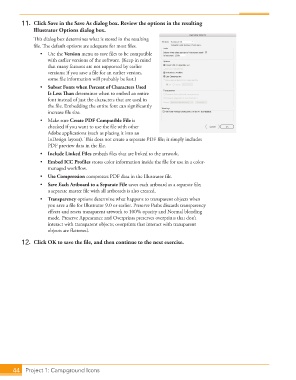
11.  Click Save in the Save As dialog box. Review the options in the resulting
                     Illustrator Options dialog box.
                   Th  is dialog box determines what is stored in the resulting
                   fi le. Th  e default options are adequate for most fi les.
                      •  Use the Version menu to save fi les to be compatible
                         with earlier versions of the software. (Keep in mind
                         that many features are not supported by earlier
                         versions; if you save a fi le for an earlier version,
                         some fi le information will probably be lost.)
                      •   Subset Fonts when Percent of Characters Used
                         Is Less Th  an determines when to embed an entire
                         font instead of just the characters that are used in
                         the fi le. Embedding the entire font can signifi cantly
                         increase fi le size.
                      •  Make sure  Create PDF Compatible File is
                         checked if you want to use the fi le with other
                         Adobe applications (such as placing it into an
                           InDesign layout). Th  is does not create a separate PDF fi le; it simply includes
                         PDF preview data in the fi le.
                      •   Include  Linked Files embeds fi les that are linked to the artwork.
                      •   Embed ICC Profi les stores color information inside the fi le for use in a color-
                         managed workfl ow.
                      •   Use Compression compresses PDF data in the Illustrator fi le.
                      •   Save Each Artboard to a Separate File saves each artboard as a separate fi le;
                         a separate master fi le with all artboards is also created.
                      •   Transparency options determine what happens to transparent objects when
                         you save a fi le for Illustrator 9.0 or earlier. Preserve Paths discards transparency
                         eff ects and resets transparent artwork to 100% opacity and Normal blending
                         mode. Preserve Appearance and Overprints preserves overprints that don’t
                         interact with transparent objects; overprints that interact with transparent
                         objects are fl attened.
               12.  Click OK to save the fi le, and then continue to the next exercise.


           44     Project 1: Campground Icons

