


Page 34 - CS6_PS_Look_Inside
P. 34
open files WitH Mini bridge
               Mini Bridge provides access to certain file-management operations of the full Bridge
               application, from a panel directly within Photoshop.

                 1.  With aftermath.psd open, choose View>Fit on Screen to show the entire
                    image centered in the document window.

                 2.  If necessary, open the Mini Bridge panel.

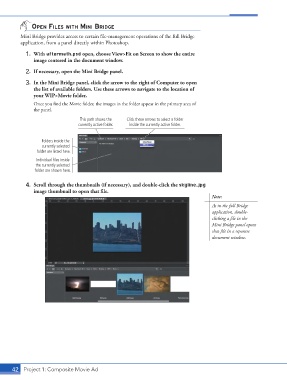
                 3.  In the Mini Bridge panel, click the arrow to the right of Computer to open
                    the list of available folders. Use these arrows to navigate to the location of
                    your WIP>Movie folder.
                    Once you find the Movie folder, the images in the folder appear in the primary area of
                    the panel.
                                       This path shows the   Click these arrows to select a folder
                                       currently active folder.  inside the currently active folder.


                        Folders inside the
                        currently selected
                      folder are listed here.

                     Individual files inside
                     the currently selected
                     folder are shown here.


                 4.  Scroll through the thumbnails (if necessary), and double-click the skyline.jpg
                    image thumbnail to open that file.
                                                                                             Note:
                                                                                             As in the full Bridge
                                                                                             application, double-
                                                                                             clicking a file in the
                                                                                             Mini Bridge panel opens
                                                                                             that file in a separate
                                                                                             document window.


           42 Project 1: Composite Movie Ad

