


Page 22 - CC2019_PS_Look_Inside
P. 22
2.  In the Options bar, make sure the Delete Cropped Pixels option is checked.
                   When this option is checked, areas outside the crop area are permanently removed   Note:
                   from all layers in the file. If this option is not checked, cropped pixels remain in the
                   file, but exist outside the edges of the canvas. The Background layer, if one exists, is   You can press the Escape
                   converted to a regular layer (you’ll learn more about Background layers later).  key to cancel the crop
                                                                                             marquee and return to
                   This is an important distinction — by maintaining cropped pixels, you can later   the uncropped image.
                   transform or reposition layers to reveal different parts of the layer within the newly
                   cropped canvas size.
                                                                                             Note:
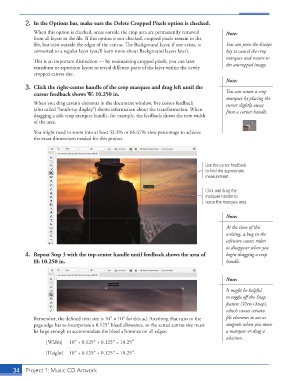
                3.  Click the right-center handle of the crop marquee and drag left until the   You can rotate a crop
                   cursor feedback shows W: 10.250 in.
                                                                                             marquee by placing the
                   When you drag certain elements in the document window, live cursor feedback   cursor slightly away
                   (also called “heads-up display”) shows information about the transformation. When   from a corner handle.
                   dragging a side crop marquee handle, for example, the feedback shows the new width
                   of the area.
                   You might need to zoom into at least 33.3% or 66.67% view percentage to achieve
                   the exact dimensions needed for this project.


                                                                                     Use the cursor feedback
                                                                                     to find the appropriate
                                                                                     measurement.

                                                                                     Click and drag the
                                                                                     marquee handle to
                                                                                     resize the marquee area.

                                                                                             Note:

                                                                                             At the time of this
                                                                                             writing, a bug in the
                                                                                             software causes rulers
                                                                                             to disappear when you
                4.  Repeat Step 3 with the top-center handle until feedback shows the area of   begin dragging a crop
                   H: 10.250 in.                                                             handle.


                                                                                             Note:

                                                                                             It might be helpful
                                                                                             to toggle off the Snap
                                                                                             feature (View>Snap),
                                                                                             which causes certain
                   Remember, the defined trim size is 10″ 1 10″ for this ad. Anything that runs to the   file elements to act as
                   page edge has to incorporate a 0.125″ bleed allowance, so the actual canvas size must   magnets when you move
                   be large enough to accommodate the bleed allowance on all edges:          a marquee or drag a
                                                                                             selection.
                        [Width]   10″ + 0.125″ + 0.125″ = 10.25″

                        [Height]   10″ + 0.125″ + 0.125″ = 10.25″


           34   Project 1: Music CD Artwork

