


Page 18 - CC2019_PS_Look_Inside
P. 18
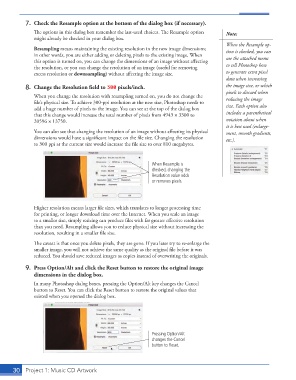
7.  Check the Resample option at the bottom of the dialog box (if necessary).
                   Th  e options in this dialog box remember the last-used choices. Th  e Resample option   Note:
                   might already be checked in your dialog box.
                                                                                             When the Resample op-
                     Resampling means maintaining the existing resolution in the new image dimensions;   tion is checked, you can
                   in other words, you are either adding or deleting pixels to the existing image. When   use the attached menu
                   this option is turned on, you can change the dimensions of an image without aff ecting
                   the resolution, or you can change the resolution of an image (useful for removing   to tell Photoshop how
                   excess resolution or  downsampling) without aff ecting the image size.    to generate extra pixel
                                                                                             data when increasing
               8.  Change the Resolution fi eld to 300 pixels/inch.                          the image size, or which
                                                                                             pixels to discard when
                   When you change the resolution with resampling turned on, you do not change the   reducing the image
                   fi le’s physical size. To achieve 300-ppi resolution at the new size, Photoshop needs to
                   add a huge number of pixels to the image. You can see at the top of the dialog box   size. Each option also
                   that this change would increase the total number of pixels from 4943 1 3300 to   includes a parenthetical
                   20596 1 13750.                                                            notation about when
                                                                                             it is best used (enlarge-
                   You can also see that changing the resolution of an image without aff ecting its physical   ment, smooth gradients,
                   dimensions would have a signifi cant impact on the fi le size. Changing the resolution   etc.).
                   to 300 ppi at the current size would increase the fi le size to over 810 megabytes.


                                                                 When Resample is
                                                                 checked, changing the
                                                                 Resolution value adds
                                                                 or removes pixels.


                   Higher resolution means larger fi le sizes, which translates to longer processing time
                   for printing, or longer download time over the Internet. When you scale an image
                   to a smaller size, simply resizing can produce fi les with far greater eff ective resolution
                   than you need. Resampling allows you to reduce physical size without increasing the
                   resolution, resulting in a smaller fi le size.

                   Th  e caveat is that once you delete pixels, they are gone. If you later try to re-enlarge the
                   smaller image, you will not achieve the same quality as the original fi le before it was
                   reduced. You should save reduced images as copies instead of overwriting the originals.
               9.  Press Option/Alt and click the Reset button to restore the original image
                   dimensions in the dialog box.
                   In many Photoshop dialog boxes, pressing the Option/Alt key changes the Cancel
                   button to Reset. You can click the  Reset button to restore the original values that
                   existed when you opened the dialog box.


                                                                 Pressing Option/Alt
                                                                 changes the Cancel
                                                                 button to Reset.


           30     Project 1: Music CD Artwork

