


Page 34 - CC2018_PS_Look_Inside
P. 34
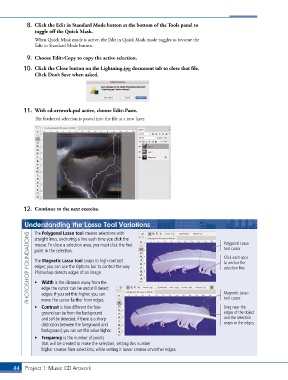
8.  Click the Edit in Standard Mode button at the bottom of the Tools panel to
               toggle off the Quick Mask.

               When Quick Mask mode is active, the Edit in Quick Mask mode toggles to become the
               Edit in Standard Mode button.

            9.  Choose Edit>Copy to copy the active selection.

           10.  Click the Close button on the Lightning.jpg document tab to close that file.
               Click Don’t Save when asked.


           11.  With cd-artwork.psd active, choose Edit>Paste.
               The feathered selection is pasted into the file as a new layer.


           12.  Continue to the next exercise.


           Understanding the Lasso Tool Variations                                           Polygonal Lasso
               The Polygonal Lasso tool creates selections with
             PHOTOSHOP FOUNDATIONS  point in the selection.                                  tool cursor
               straight lines, anchoring a line each time you click the
               mouse. To close a selection area, you must click the first


                                                                                             Click each spot
               The Magnetic Lasso tool snaps to high-contrast
                                                                                             to anchor the
               edges; you can use the Options bar to control the way
                                                                                             selection line.
               Photoshop detects edges of an image.
               •  Width is the distance away from the
                  edge the cursor can be and still detect
                  edges; if you set this higher, you can
                                                                                             tool cursor
                  move the cursor farther from edges.
               •  Contrast is how different the fore-                                        Magnetic Lasso
                                                                                             Drag near the
                  ground can be from the background                                          edges of the object
                  and still be detected; if there is a sharp                                 and the selection
                  distinction between the foreground and                                     snaps to the edges.
                  background, you can set this value higher.
               •  Frequency is the number of points
                  that will be created to make the selection; setting this number
                  higher creates finer selections, while setting it lower creates smoother edges.


       44 Project 1: Music CD Artwork

