


Page 36 - CC2018_PS_Look_Inside
P. 36
4.  Open the Window>Arrange menu and choose 2-up Vertical to show both
               open files at one time.

               As you saw in the Interface chapter, these options are useful for arranging and viewing
               multiple open files within your workspace.

            5.  Choose the Move tool in the Tools panel.

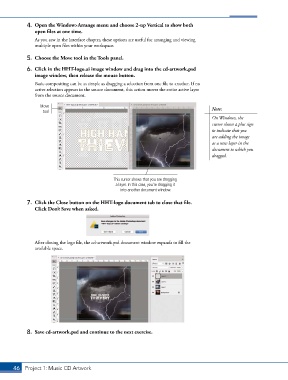
            6.  Click in the HHT-logo.ai image window and drag into the cd-artwork.psd
               image window, then release the mouse button.
               Basic compositing can be as simple as dragging a selection from one file to another. If no
               active selection appears in the source document, this action moves the entire active layer
               from the source document.

                  Move                                                                  Note:
                   tool
                                                                                        On Windows, the
                                                                                        cursor shows a plus sign
                                                                                        to indicate that you
                                                                                        are adding the image
                                                                                        as a new layer in the
                                                                                        document to which you
                                                                                        dragged.


                                                This cursor shows that you are dragging
                                                 a layer. In this case, you’re dragging it
                                                   into another document window.

            7.  Click the Close button on the HHT-logo document tab to close that file.
               Click Don’t Save when asked.


               After closing the logo file, the cd-artwork.psd document window expands to fill the
               available space.


            8.  Save cd-artwork.psd and continue to the next exercise.


       46 Project 1: Music CD Artwork

