


Page 67 - Adobe Photoshop 2022
P. 67
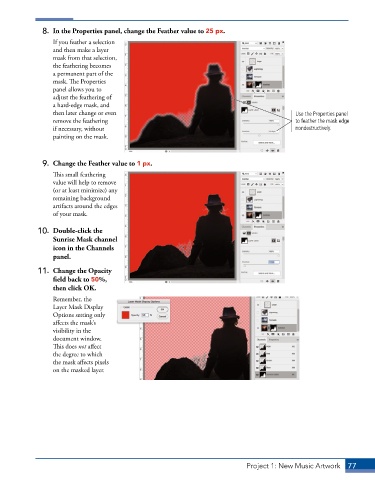
8.  In the Properties panel, change the Feather value to 25 px.
                 If you feather a selection
                 and then make a layer
                 mask from that selection,
                 the feathering becomes
                 a permanent part of the
                 mask. The Properties
                 panel allows you to
                 adjust the feathering of
                 a hard-edge mask, and
                 then later change or even                                                 Use the Properties panel
                 remove the feathering                                                     to feather the mask edge
                 if necessary, without                                                     nondestructively.
                 painting on the mask.


              9.  Change the Feather value to 1 px.
                 This small feathering
                 value will help to remove
                 (or at least minimize) any
                 remaining background
                 artifacts around the edges
                 of your mask.

             10.  Double-click the
                 Sunrise Mask channel
                 icon in the Channels
                 panel.

             11.  Change the Opacity
                 field back to 50%,
                 then click OK.
                 Remember, the
                 Layer Mask Display
                 Options setting only
                 affects the mask’s
                 visibility in the
                 document window.
                 This does not affect
                 the degree to which
                 the mask affects pixels
                 on the masked layer.


                                                                            Project 1: New Music Artwork   77

