


Page 62 - Adobe Photoshop 2022
P. 62
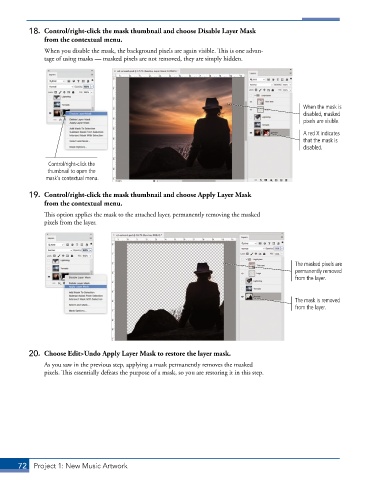
18.  Control/right-click the mask thumbnail and choose Disable Layer Mask
              from the contextual menu.
               When you disable the mask, the background pixels are again visible. This is one advan-
               tage of using masks — masked pixels are not removed, they are simply hidden.


                                                                                              When the mask is
                                                                                              disabled, masked
                                                                                              pixels are visible.

                                                                                              A red X indicates
                                                                                              that the mask is
                                                                                              disabled.


                Control/right-click the
                thumbnail to open the
               mask’s contextual menu.

          19.  Control/right-click the mask thumbnail and choose Apply Layer Mask
              from the contextual menu.
               This option applies the mask to the attached layer, permanently removing the masked
               pixels from the layer.


                                                                                           The masked pixels are
                                                                                           permanently removed
                                                                                           from the layer.


                                                                                           The mask is removed
                                                                                           from the layer.


          20.  Choose Edit>Undo Apply Layer Mask to restore the layer mask.

               As you saw in the previous step, applying a mask permanently removes the masked
               pixels. This essentially defeats the purpose of a mask, so you are restoring it in this step.


       72  Project 1: New Music Artwork

