


Page 64 - Adobe Photoshop CC 2020
P. 64
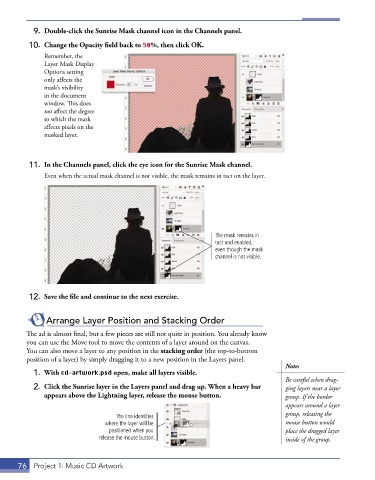
9.  Double-click the Sunrise Mask channel icon in the Channels panel.

          10.  Change the Opacity field back to 50%, then click OK.
               Remember, the
               Layer Mask Display
               Options setting
               only affects the
               mask’s visibility
               in the document
               window. This does
               not affect the degree
               to which the mask
               affects pixels on the
               masked layer.


          11.  In the Channels panel, click the eye icon for the Sunrise Mask channel.

               Even when the actual mask channel is not visible, the mask remains in tact on the layer.


                                                                   The mask remains in
                                                                   tact and enabled,
                                                                   even though the mask
                                                                   channel is not visible.


          12.  Save the file and continue to the next exercise.


               Arrange Layer Position and Stacking Order

         The ad is almost final, but a few pieces are still not quite in position. You already know
         you can use the Move tool to move the contents of a layer around on the canvas.
         You can also move a layer to any position in the stacking order (the top-to-bottom
         position of a layer) by simply dragging it to a new position in the Layers panel.
                                                                                        Note:
           1.  With cd-artwork.psd open, make all layers visible.
                                                                                        Be careful when drag-
           2.  Click the Sunrise layer in the Layers panel and drag up. When a heavy bar   ging layers near a layer
              appears above the Lightning layer, release the mouse button.              group. If the border
                                                                                        appears around a layer
                                                                                        group, releasing the
                                    The line identifies
                                 where the layer will be                                mouse button would
                                  positioned when you                                   place the dragged layer
                               release the mouse button.                                inside of the group.


       76  Project 1: Music CD Artwork

