


Page 65 - Adobe Photoshop CC 2020
P. 65
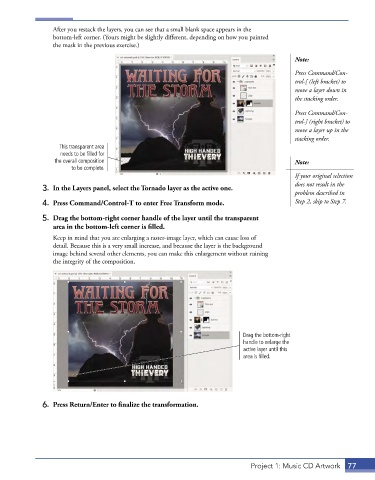
After you restack the layers, you can see that a small blank space appears in the
                 bottom-left corner. (Yours might be slightly different, depending on how you painted
                 the mask in the previous exercise.)

                                                                                           Note:
                                                                                           Press Command/Con-
                                                                                           trol-[ (left bracket) to
                                                                                           move a layer down in
                                                                                           the stacking order.

                                                                                           Press Command/Con-
                                                                                           trol-] (right bracket) to
                                                                                           move a layer up in the
                                                                                           stacking order.
                   This transparent area
                   needs to be filled for
                  the overall composition                                                  Note:
                       to be complete.
                                                                                           If your original selection
                                                                                           does not result in the
              3.  In the Layers panel, select the Tornado layer as the active one.
                                                                                           problem described in
              4.  Press Command/Control-T to enter Free Transform mode.                    Step 2, skip to Step 7.

              5.  Drag the bottom-right corner handle of the layer until the transparent
                 area in the bottom-left corner is filled.
                 Keep in mind that you are enlarging a raster-image layer, which can cause loss of
                 detail. Because this is a very small increase, and because the layer is the background
                 image behind several other elements, you can make this enlargement without ruining
                 the integrity of the composition.


                                                                           Drag the bottom-right
                                                                           handle to enlarge the
                                                                           active layer until this
                                                                           area is filled.


              6.  Press Return/Enter to finalize the transformation.


                                                                              Project 1: Music CD Artwork  77

