


Page 63 - Adobe Photoshop CC 2020
P. 63
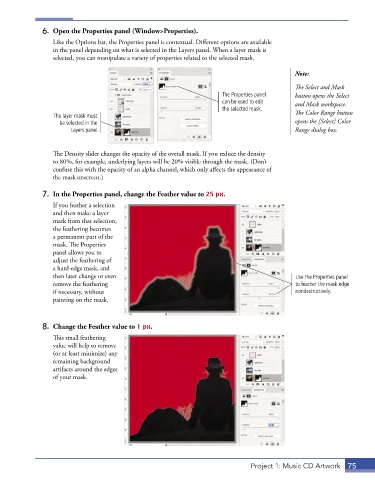
6.  Open the Properties panel (Window>Properties).
                 Like the Options bar, the Properties panel is contextual. Different options are available
                 in the panel depending on what is selected in the Layers panel. When a layer mask is
                 selected, you can manipulate a variety of properties related to the selected mask.

                                                                                           Note:

                                                                                           The Select and Mask
                                                                     The Properties panel   button opens the Select
                                                                     can be used to edit   and Mask workspace.
                                                                     the selected mask.
                 The layer mask must                                                       The Color Range button
                   be selected in the                                                      opens the [Select] Color
                       Layers panel.                                                       Range dialog box.


                 The Density slider changes the opacity of the overall mask. If you reduce the density
                 to 80%, for example, underlying layers will be 20% visible through the mask. (Don’t
                 confuse this with the opacity of an alpha channel, which only affects the appearance of
                 the mask onscreen.)

              7.  In the Properties panel, change the Feather value to 25 px.
                 If you feather a selection
                 and then make a layer
                 mask from that selection,
                 the feathering becomes
                 a permanent part of the
                 mask. The Properties
                 panel allows you to
                 adjust the feathering of
                 a hard-edge mask, and
                 then later change or even                                                 Use the Properties panel
                 remove the feathering                                                     to feather the mask edge
                 if necessary, without                                                     nondestructively.
                 painting on the mask.


              8.  Change the Feather value to 1 px.

                 This small feathering
                 value will help to remove
                 (or at least minimize) any
                 remaining background
                 artifacts around the edges
                 of your mask.


                                                                              Project 1: Music CD Artwork  75

