


Page 36 - CC2017_ID_Look_Inside
P. 36
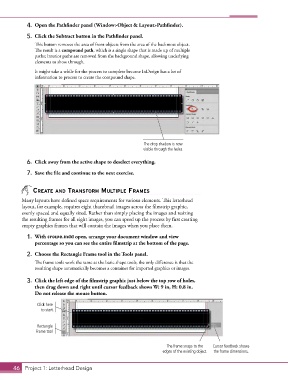
4.  Open the Pathfinder panel (Window>Object & Layout>Pathfinder).
            5.  Click the Subtract button in the Pathfinder panel.

               This button removes the area of front objects from the area of the backmost object.
               The result is a compound path, which is a single shape that is made up of multiple
               paths; interior paths are removed from the background shape, allowing underlying
               elements to show through.

               It might take a while for the process to complete because InDesign has a lot of
               information to process to create the compound shape.


                                                            The drop shadow is now
                                                            visible through the holes.

            6.  Click away from the active shape to deselect everything.

            7.  Save the file and continue to the next exercise.


               CreAte And trAnsForm multiPle FrAmes

          Many layouts have defined space requirements for various elements. This letterhead
          layout, for example, requires eight thumbnail images across the filmstrip graphic,
          evenly spaced and equally sized. Rather than simply placing the images and resizing
          the resulting frames for all eight images, you can speed up the process by first creating
          empty graphics frames that will contain the images when you place them.

            1.  With crowe.indd open, arrange your document window and view
               percentage so you can see the entire filmstrip at the bottom of the page.

            2.  Choose the Rectangle Frame tool in the Tools panel.
               The frame tools work the same as the basic shape tools; the only difference is that the
               resulting shape automatically becomes a container for imported graphics or images.

            3.  Click the left edge of the filmstrip graphic just below the top row of holes,
               then drag down and right until cursor feedback shows W: 9 in, H: 0.8 in.
               Do not release the mouse button.

                Click here
                  to start.


                Rectangle
                Frame tool

                                                                      The frame snaps to the   Cursor feedback shows
                                                                    edges of the existing object.  the frame dimensions.


       46 Project 1: Letterhead Design

