


Page 51 - Adobe Indesign CC 2020
P. 51
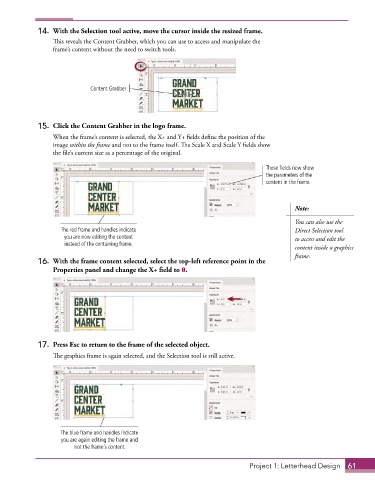
14.  With the Selection tool active, move the cursor inside the resized frame.
                 This reveals the Content Grabber, which you can use to access and manipulate the
                 frame’s content without the need to switch tools.


                             Content Grabber


             15.  Click the Content Grabber in the logo frame.
                 When the frame’s content is selected, the X+ and Y+ fields define the position of the
                 image within the frame and not to the frame itself. The Scale X and Scale Y fields show
                 the file’s current size as a percentage of the original.

                                                                                  These fields now show
                                                                                  the parameters of the
                                                                                  content in the frame.


                                                                                           Note:

                                                                                           You can also use the
                    The red frame and handles indicate                                     Direct Selection tool
                     you are now editing the content                                       to access and edit the
                     instead of the containing frame.
                                                                                           content inside a graphics
                                                                                           frame.
             16.  With the frame content selected, select the top-left reference point in the
                 Properties panel and change the X+ field to 0.


             17.  Press Esc to return to the frame of the selected object.
                 The graphics frame is again selected, and the Selection tool is still active.


                    The blue frame and handles indicate
                    you are again editing the frame and
                        not the frame’s content.


                                                                             Project 1: Letterhead Design  61

