


Page 61 - CS6_AI_Look_Inside.pdf
P. 61
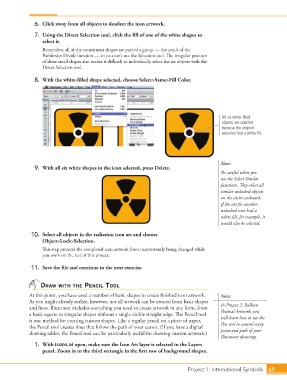
6.  Click away from all objects to deselect the icon artwork.

                    7.  Using the Direct Selection tool, click the fill of one of the white shapes to
                        select it.
                        Remember, all of the constituent shapes are part of a group — the result of the
                        Pathfinder Divide function — so you can’t use the Selection tool. The irregular position
                        of these small shapes also makes it difficult to individually select the six objects with the
                        Direct Selection tool.

                    8.  With the white-filled shape selected, choose Select>Same>Fill Color.


                                                                                                 All six white-filled
                                                                                                 objects are selected
                                                                                                 because the original
                                                                                                 selection had a white fill.


                                                                                                 Note:
                    9.  With all six white shapes in the icon selected, press Delete.
                                                                                                 Be careful when you
                                                                                                 use the Select Similar
                                                                                                 functions. They select all
                                                                                                 similar unlocked objects
                                                                                                 on the entire artboard.
                                                                                                 If the art for another
                                                                                                 unlocked icon had a
                                                                                                 white fill, for example, it
                                                                                                 would also be selected.
                   10.  Select all objects in the radiation icon art and choose
                        Object>Lock>Selection.
                        This step protects the completed icon artwork from inadvertently being changed while
                        you work on the rest of this project.

                   11.  Save the file and continue to the next exercise.


                       draw with the Pencil tool
                  At this point, you have used a number of basic shapes to create finished icon artwork.   Note:
                  As you might already realize, however, not all artwork can be created from basic shapes
                  and lines. Illustrator includes everything you need to create artwork in any form, from   In Project 2: Balloon
                  a basic square to irregular shapes without a single visible straight edge. The Pencil tool   Festival Artwork, you
                  is one method for creating custom shapes. Like a regular pencil on a piece of paper,   will learn how to use the
                  the Pencil tool creates lines that follow the path of your cursor. (If you have a digital   Pen tool to control every
                  drawing tablet, the Pencil tool can be particularly useful for drawing custom artwork.)  point and path of your
                                                                                                 Illustrator drawings.
                    1.  With icons.ai open, make sure the Icon Art layer is selected in the Layers
                        panel. Zoom in to the third rectangle in the first row of background shapes.


                                                                                   Project 1: International Symbols  69

