


Page 63 - CC2018_AI_Look_Inside
P. 63
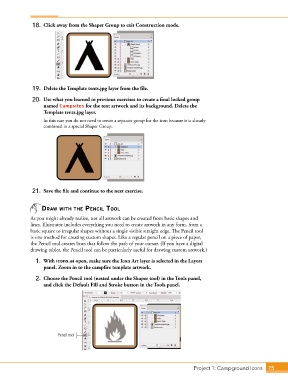
18.  Click away from the Shaper Group to exit Construction mode.


               19.  Delete the Template tents.jpg layer from the file.

               20.  Use what you learned in previous exercises to create a final locked group
                   named Campsites for the tent artwork and its background. Delete the
                   Template tents.jpg layer.
                   In this case you do not need to create a separate group for the icon because it is already
                   combined in a special Shaper Group.


               21.  Save the file and continue to the next exercise.


                  draW WIth thE pEncIl tool
              As you might already realize, not all artwork can be created from basic shapes and
              lines. Illustrator includes everything you need to create artwork in any form, from a
              basic square to irregular shapes without a single visible straight edge. The Pencil tool
              is one method for creating custom shapes. Like a regular pencil on a piece of paper,
              the Pencil tool creates lines that follow the path of your cursor. (If you have a digital
              drawing tablet, the Pencil tool can be particularly useful for drawing custom artwork.)
                1.  With icons.ai open, make sure the Icon Art layer is selected in the Layers
                   panel. Zoom in to the campfire template artwork.

                2.  Choose the Pencil tool (nested under the Shaper tool) in the Tools panel,
                   and click the Default Fill and Stroke button in the Tools panel.


                         Pencil tool


                                                                                 Project 1: Campground Icons    75

