


Page 27 - CC2018_AI_Look_Inside
P. 27
12.  Using the Selection tool, click the third rectangle on the artboard.
                   Again, the Fill and Stroke icons in the Tools panel change to reflect the colors of the
                   selected object.

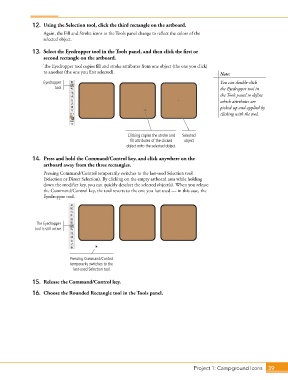
               13.  Select the Eyedropper tool in the Tools panel, and then click the first or
                   second rectangle on the artboard.
                   The Eyedropper tool copies fill and stroke attributes from one object (the one you click)
                   to another (the one you first selected).                                 Note:
                   Eyedropper                                                               You can double-click
                        tool                                                                the Eyedropper tool in
                                                                                            the Tools panel to define
                                                                                            which attributes are
                                                                                            picked up and applied by
                                                                                            clicking with the tool.


                                                      Clicking copies the stroke and   Selected
                                                       fill attributes of the clicked   object
                                                     object onto the selected object.

               14.  Press and hold the Command/Control key, and click anywhere on the
                   artboard away from the three rectangles.
                   Pressing Command/Control temporarily switches to the last-used Selection tool
                   (Selection or Direct Selection). By clicking on the empty artboard area while holding
                   down the modifier key, you can quickly deselect the selected object(s). When you release
                   the Command/Control key, the tool reverts to the one you last used — in this case, the
                   Eyedropper tool.


                The Eyedropper
               tool is still active.


                              Pressing Command/Control
                              temporarily switches to the
                               last-used Selection tool.

               15.  Release the Command/Control key.

               16.  Choose the Rounded Rectangle tool in the Tools panel.


                                                                                 Project 1: Campground Icons    39

