


Page 34 - CC2017_DW_Look_Inside
P. 34
CreAte An emAil link
          Most Web sites include one or more external links (including email links), which
          require the appropriate protocol to tell the browser what type of link is present.
              An email link requires the “mailto:” protocol, followed by the appropriate email
          address. This instructs the browser to open a new mail message with the defined
          address already in the To line.

            1.  With the Kinetic site open in the Files panel, open contact.html.
               Make sure the Live view is not active.

            2.  Select the words “[email protected]” in the main content area.

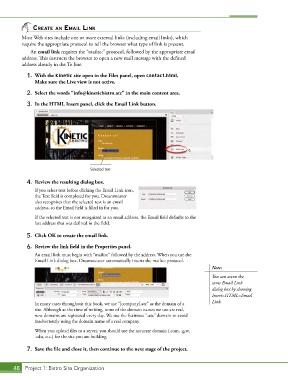
            3.  In the HTML Insert panel, click the Email Link button.


                                      Selected text

            4.  Review the resulting dialog box.
               If you select text before clicking the Email Link icon,
               the Text field is completed for you. Dreamweaver
               also recognizes that the selected text is an email
               address, so the Email field is filled in for you.
               If the selected text is not recognized as an email address, the Email field defaults to the
               last address that was defined in the field.

            5.  Click OK to create the email link.

            6.  Review the link field in the Properties panel.
               An email link must begin with “mailto:” followed by the address. When you use the
               Email Link dialog box, Dreamweaver automatically inserts the mailto: protocol.
                                                                                        Note:
                                                                                        You can access the
                                                                                        same Email Link
                                                                                        dialog box by choosing
                                                                                        Insert>HTML>Email

               In many cases throughout this book, we use “[company].atc” as the domain of a   Link.
               site. Although at the time of writing, none of the domain names we use are real,
               new domains are registered every day. We use the fictitious “.atc” domain to avoid
               inadvertently using the domain name of a real company.
               When you upload files to a server, you should use the accurate domain (.com, .gov,
               .edu, etc.) for the site you are building.

            7.  Save the file and close it, then continue to the next stage of the project.


       48 Project 1: Bistro Site Organization

