


Page 25 - CC2017_DW_Look_Inside
P. 25
7.  Open the Target menu and choose _self.
                   This option determines where the linked file will open:
                      •  _blank opens every linked file in a new, unnamed browser window.
                      •   new creates a new browser window with the name “_new”. Every link assigned
                        the _new target will open in that same _new browser window.
                      •  _ parent is relevant if a page includes nested frames; this option opens the link in
                         the frame or window that contains the frame with the link.
                      •  _self opens the link in the same frame or browser window as the link. This is the
                        default behavior if you do not choose an option in the Target menu.
                      •  _top opens the link in the same browser window, regardless of frames.
                                                                                            Note:
                8.  In the Title field, type Kinetic Bistro home page.
                                                                                            You can use the Access
                   The Title field defines text that appears when the cursor is placed over the link text.   Key field to define a
                   Defining a descriptive title for links can help a page achieve better search engine results.
                                                                                            keyboard shortcut for
                                                                                            the link and use the Tab
                                                                                            Index field to specify the
                                                                                            number of times a user
                                                                                            needs to press the Tab key
                                                                                            to select the link.


                9.  Click OK in the Hyperlink dialog box to create the link.

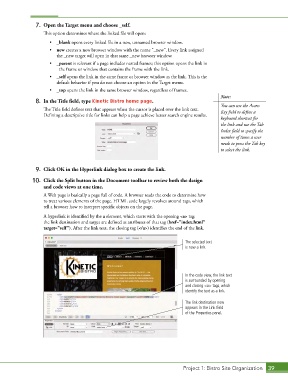
               10.  Click the Split button in the Document toolbar to review both the design
                   and code views at one time.

                   A Web page is basically a page full of code. A browser reads the code to determine how
                   to treat various elements of the page. HTML code largely revolves around tags, which
                   tell a browser how to interpret specific objects on the page.

                   A hyperlink is identified by the a element, which starts with the opening <a> tag;
                   the link destination and target are defined as attributes of that tag (href="index.html"
                   target="self"). After the link text, the closing tag (</a>) identifies the end of the link.


                                                                             The selected text
                                                                             is now a link.


                                                                             In the code view, the link text
                                                                             is surrounded by opening
                                                                             and closing <a> tags, which
                                                                             identify the text as a link.

                                                                             The link destination now
                                                                             appears in the Link field
                                                                             of the Properties panel.


                                                                             Project 1: Bistro Site Organization  39

