


Page 21 - CC2017_DW_Look_Inside
P. 21
Changing the Update Preferences

                DREAMWEAVER FOUNDATIONS  Preferences dialog box.
                   As you have seen, Dreamweaver automatically asks you to
                   update links when you move a file in the Files panel. You
                   can change this behavior in the General pane of the


                   If you choose Always in the Update Links... menu, the
                   affected links are automatically updated without user
                   intervention. In other words, you do not see the Update Files
                   dialog box during the process.

                   If you choose Never, links are not automatically updated
                   when you move files in the Files panel. If you do not
                   manually correct links, they will result in an error when
                   clicked by a user.


              Stage 2  Organizing the Site Navigation

              Hyperlinks (the official term for links) can be created to link pages on a site to other pages within the
              same site, or to pages on other sites. A well-designed site includes links that make it easy to get to any
              part of a site from any other part of a site. You should carefully plan the flow of links and connections
              between pages — always keeping the reader’s usability in mind.
                 Organizing links is a simple application of a science called information architecture, which is
              the organization of a Web site to support both usability and “findability.” As you organize site links,
              remember that your goal is to enable visitors to see a pattern in your links, which will assist them in
              navigating through your site. Keep the following points in mind when you plan a site’s link structure:
                 •  You can’t know how visitors will enter your site. The primary site pages (home, about us, etc.)
                    should be accessible from every page on the site.
                 •  When linking secondary pages such as different menus for different mealtimes, don’t make
                    users constantly click the browser’s Back button. Links should allow users to navigate all
                    sibling pages (at the same level) as easily as navigating the primary structure. For example,
                    users should be able to access the dinner menu or lunch menu in the restaurant’s site without
                    first going back to a main “Menu” page.

                 Using the terms “parent,” “child,” and “sibling” is simply a way of describing relationships between
              pages. A large Web site cannot provide links to all of the pages from its home page. By grouping pages,
              grouping groups of pages, and so on, you create relationships of equality between pages that are
              grouped together, as well as between groups that are grouped together.
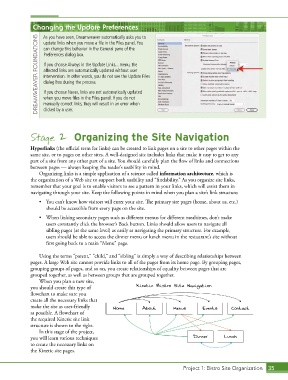
                 When you plan a new site,
              you should create this type of             Kinetic Bistro Site Navigation
              flowchart to make sure you
              create all the necessary links that
              make the site as user-friendly    Home        About       Menus        Events     Contact
              as possible. A flowchart of
              the required Kinetic site link
              structure is shown to the right.
                 In this stage of the project,
              you will learn various techniques                                 Dinner       Lunch
              to create the necessary links on
              the Kinetic site pages.


                                                                             Project 1: Bistro Site Organization  35

