


Page 17 - CC 2019 WD Look Inside
P. 17
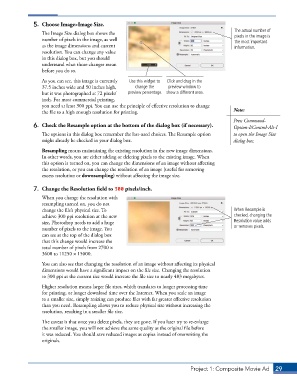
5.  Choose Image>Image Size.
                                                                                           The actual number of
                 The Image Size dialog box shows the                                       pixels in the image is
                 number of pixels in the image, as well                                    the most important
                 as the image dimensions and current                                       information.
                 resolution. You can change any value
                 in this dialog box, but you should
                 understand what those changes mean
                 before you do so.

                 As you can see, this image is currently   Use this widget to   Click and drag in the
                 37.5 inches wide and 50 inches high,   change the   preview window to
                 but it was photographed at 72 pixels/  preview percentage. show a different area.
                 inch. For most commercial printing,
                 you need at least 300 ppi. You can use the principle of effective resolution to change
                 the file to a high enough resolution for printing.                        Note:
                                                                                           Press Command-
              6.  Check the Resample option at the bottom of the dialog box (if necessary).  Option-I/Control-Alt-I

                 The options in this dialog box remember the last-used choices. The Resample option   to open the Image Size
                 might already be checked in your dialog box.                              dialog box.

                 Resampling means maintaining the existing resolution in the new image dimensions.
                 In other words, you are either adding or deleting pixels to the existing image. When
                 this option is turned on, you can change the dimensions of an image without affecting
                 the resolution, or you can change the resolution of an image (useful for removing
                 excess resolution or downsampling) without affecting the image size.

              7.  Change the Resolution field to 300 pixels/inch.
                 When you change the resolution with
                 resampling turned on, you do not
                 change the file’s physical size. To                                       When Resample is
                 achieve 300 ppi resolution at the new                                     checked, changing the
                 size, Photoshop needs to add a huge                                       Resolution value adds
                 number of pixels to the image. You                                        or removes pixels.
                 can see at the top of the dialog box
                 that this change would increase the
                 total number of pixels from 2700 1
                 3600 to 11250 1 15000.

                 You can also see that changing the resolution of an image without affecting its physical
                 dimensions would have a significant impact on the file size. Changing the resolution
                 to 300 ppi at the current size would increase the file size to nearly 483 megabytes.
                 Higher resolution means larger file sizes, which translates to longer processing time
                 for printing, or longer download time over the Internet. When you scale an image
                 to a smaller size, simply resizing can produce files with far greater effective resolution
                 than you need. Resampling allows you to reduce physical size without increasing the
                 resolution, resulting in a smaller file size.

                 The caveat is that once you delete pixels, they are gone. If you later try to re-enlarge
                 the smaller image, you will not achieve the same quality as the original file before
                 it was reduced. You should save reduced images as copies instead of overwriting the
                 originals.


                                                                          Project 1: Composite Movie Ad    29

