


Page 16 - CC 2019 WD Look Inside
P. 16
If a 300-ppi image is magnified 150%, the effective resolution is:
                 300 ppi ÷ 1.5 = 200 ppi

             In other words, the more you enlarge a raster image, the lower its effective
         resolution becomes. In general, you can make an image 10% or 15% larger without
         significant adverse effects. The more you enlarge an image, however, the worse the
         results. Even Photoshop, which offers very sophisticated formulas (called algorithms)
         for sizing images, cannot guarantee perfect results.
             Effective resolution can be a very important consideration when working with
         client-supplied images, especially those that come from consumer-level digital
         cameras. Many of those devices capture images with a specific number of pixels,
         rather than a number of pixels per inch (ppi). In this exercise, you will explore
         the effective resolution of an image to see if it can be used for a full-page, printed
         magazine ad.

           1.  Download Movie_Web19_RF.zip from the Student Files web page.

           2.  Expand the ZIP archive in your WIP folder (Macintosh) or copy the
              archive contents into your WIP folder (Windows).

               This results in a folder named Movie, which contains all of the files you need for this
               project. You should also use this folder to save the files you create in this project.

               If necessary, refer to Page 1 of the Interface chapter for specific information on
               expanding or accessing the required resource files.
                                                                                        Note:
           3.  In Photoshop, choose File>Open and navigate to your WIP>Movie folder.    Press Command/
              Select Bricks.jpg and click Open.                                         Control-R to show or
               If you see a warning about mismatched profiles at any point in this project, choose the   hide rulers.
               option to use the embedded profile.
                                                                                        Note:
           4.  If the rulers are not visible on the top and left edges, choose View>Rulers.
                                                                                        Although designers
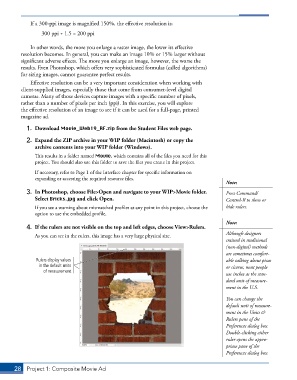
               As you can see in the rulers, this image has a very large physical size.
                                                                                        trained in traditional
                                                                                        (non-digital) methods
                                                                                        are sometimes comfort-
               Rulers display values                                                    able talking about picas
                in the default units                                                    or ciceros, most people
                  of measurement.
                                                                                        use inches as the stan-
                                                                                        dard unit of measure-
                                                                                        ment in the U.S.

                                                                                        You can change the
                                                                                        default unit of measure-
                                                                                        ment in the Units &
                                                                                        Rulers pane of the
                                                                                        Preferences dialog box.
                                                                                        Double-clicking either
                                                                                        ruler opens the appro-
                                                                                        priate pane of the
                                                                                        Preferences dialog box.


       28  Project 1: Composite Movie Ad

