


Page 17 - CC2017_WD_Look_Inside
P. 17
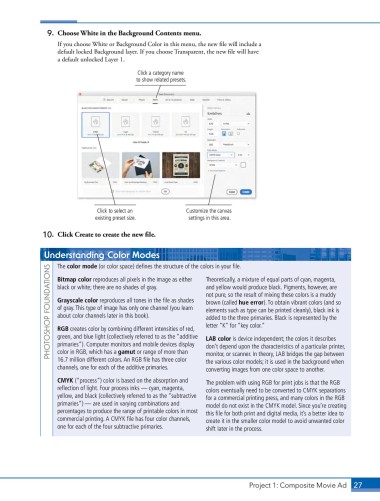
9.  Choose White in the Background Contents menu.
                   If you choose White or Background Color in this menu, the new file will include a
                   default locked Background layer. If you choose Transparent, the new file will have
                   a default unlocked Layer 1.

                                            Click a category name
                                            to show related presets.


                               Click to select an          Customize the canvas
                               existing preset size.        settings in this area.

               10.  Click Create to create the new file.


               Understanding Color Modes                         Theoretically, a mixture of equal parts of cyan, magenta,
                   The color mode (or color space) defines the structure of the colors in your file.
                 PHOTOSHOP FOUNDATIONS  black or white; there are no shades of gray.   and yellow would produce black. Pigments, however, are
                   Bitmap color reproduces all pixels in the image as either

                                                                 not pure, so the result of mixing these colors is a muddy
                   Grayscale color reproduces all tones in the file as shades
                                                                 brown (called hue error). To obtain vibrant colors (and so
                   of gray. This type of image has only one channel (you learn
                                                                 elements such as type can be printed cleanly), black ink is
                   about color channels later in this book).
                                                                 added to the three primaries. Black is represented by the
                                                                 letter “K” for “key color.”
                   RGB creates color by combining different intensities of red,
                   green, and blue light (collectively referred to as the “additive
                                                                 LAB color is device independent; the colors it describes
                   primaries”). Computer monitors and mobile devices display
                   color in RGB, which has a gamut or range of more than
                                                                 monitor, or scanner. In theory, LAB bridges the gap between
                   16.7 million different colors. An RGB file has three color
                                                                 the various color models; it is used in the background when
                   channels, one for each of the additive primaries.  don’t depend upon the characteristics of a particular printer,
                                                                 converting images from one color space to another.
                   CMYK (“process”) color is based on the absorption and   The problem with using RGB for print jobs is that the RGB
                   reflection of light. Four process inks — cyan, magenta,   colors eventually need to be converted to CMYK separations
                   yellow, and black (collectively referred to as the “subtractive   for a commercial printing press, and many colors in the RGB
                   primaries”) — are used in varying combinations and   model do not exist in the CMYK model. Since you’re creating
                   percentages to produce the range of printable colors in most   this file for both print and digital media, it’s a better idea to
                   commercial printing. A CMYK file has four color channels,   create it in the smaller color model to avoid unwanted color
                   one for each of the four subtractive primaries.  shift later in the process.


                                                                               Project 1: Composite Movie Ad    27

