


Page 57 - CC2018_PS_Look_Inside
P. 57
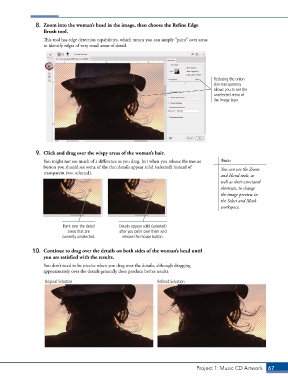
8.  Zoom into the woman’s head in the image, then choose the Refine Edge
                   Brush tool.

                   This tool has edge detection capabilities, which means you can simply “paint” over areas
                   to identify edges of very small areas of detail.


                                                                                         Reducing the onion
                                                                                         skin transparency
                                                                                         allows you to see the
                                                                                         unselected areas of
                                                                                         the image layer.


                9.  Click and drag over the wispy areas of the woman’s hair.
                   You might not see much of a difference as you drag, but when you release the mouse   Note:
                   button you should see some of the thin details appear solid (selected) instead of   You can use the Zoom
                   transparent (not selected).
                                                                                            and Hand tools, as
                                                                                            well as their associated
                                                                                            shortcuts, to change
                                                                                            the image preview in
                                                                                            the Select and Mask
                                                                                            workspace.


                           Paint over the detail   Details appear solid (selected)
                             areas that are       after you paint over them and
                           currently unselected.   release the mouse button.


               10.  Continue to drag over the details on both sides of the woman’s head until
                   you are satisfied with the results.

                   You don’t need to be precise when you drag over the details, although dragging
                   approximately over the details generally does produce better results.

                   Original Selection                             Refined Selection


                                                                                  Project 1: Music CD Artwork   67

