


Page 55 - CC2018_PS_Look_Inside
P. 55
crEatE and rEfInE a color-basEd sElEctIon
              Many images have both hard and soft edges, and/or very fine detail that needs to be
              isolated from its background (think of a model’s blowing hair overlapping the title on
              the cover of a magazine). In this exercise, you are going to use two techniques to isolate
              the woman’s silhouette (and the ground where she is sitting) in the Sunrise image layer.
                1.  With cd-artwork.psd open, hide all but the Sunrise layer. Click the
                   Sunrise layer to make it active.

                2.  Choose the Quick Selection tool in the Tools panel.

                3.  In the Options bar, make sure the Sample All Layers option is not checked.
                   You only want to select an area based on the Sunrise layer content, so you do not want
                   to make a selection based on the content of other layers in the file.

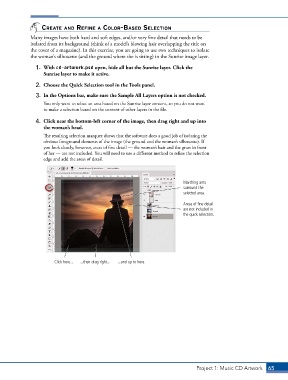
                4.  Click near the bottom-left corner of the image, then drag right and up into
                   the woman’s head.
                   The resulting selection marquee shows that the software does a good job of isolating the
                   obvious foreground elements of the image (the ground and the woman’s silhouette). If
                   you look closely, however, areas of fine detail — the woman’s hair and the grass in front
                   of her — are not included. You will need to use a different method to refine the selection
                   edge and add the areas of detail.


                                                                             Marching ants
                                                                             surround the
                                                                             selected area.

                                                                             Areas of fine detail
                                                                             are not included in
                                                                             the quick selection.


                       Click here...  ...then drag right...  ...and up to here.


                                                                                  Project 1: Music CD Artwork   65

