


Page 47 - CC2018_PS_Look_Inside
P. 47
movE and transform rEgular layErs
              Smart Object layers enable non-destructive transformations, which means those
              transformations can be changed or undone without affecting the quality of the layer
              content. Transforming a regular layer, on the other hand, is destructive and permanent.

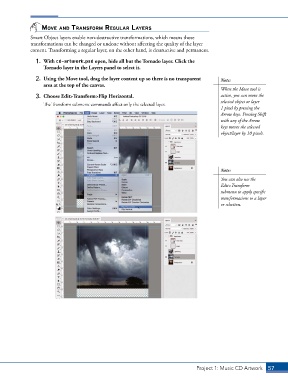
                1.  With cd-artwork.psd open, hide all but the Tornado layer. Click the
                   Tornado layer in the Layers panel to select it.
                2.  Using the Move tool, drag the layer content up so there is no transparent   Note:
                   area at the top of the canvas.
                                                                                            When the Move tool is
                3.  Choose Edit>Transform>Flip Horizontal.                                  active, you can move the
                                                                                            selected object or layer
                   The Transform submenu commands affect only the selected layer.
                                                                                            1 pixel by pressing the
                                                                                            Arrow keys. Pressing Shift
                                                                                            with any of the Arrow
                                                                                            keys moves the selected
                                                                                            object/layer by 10 pixels.


                                                                                            Note:
                                                                                            You can also use the
                                                                                            Edit>Transform
                                                                                            submenu to apply specific
                                                                                            transformations to a layer
                                                                                            or selection.


                                                                                  Project 1: Music CD Artwork   57

