


Page 54 - CC2017_PS_Look_Inside
P. 54
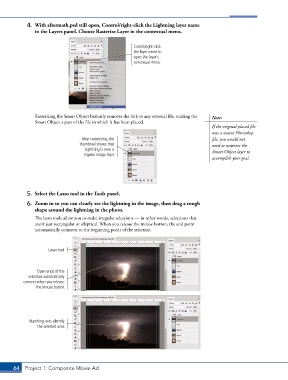
4.  With aftermath.psd still open, Control/right-click the Lightning layer name
               in the Layers panel. Choose Rasterize Layer in the contextual menu.


                                                        Contol/right-click
                                                        the layer name to
                                                        open the layer’s
                                                        contextual menu.


               Rasterizing the Smart Object basically removes the link to any external file, making the   Note:
               Smart Object a part of the file in which it has been placed.
                                                                                        If the original placed file
                                                                                        was a native Photoshop
                                   After rasterizing, the                               file, you would not
                                  thumbnail shows that                                  need to rasterize the
                                    Lightning is now a                                  Smart Object layer to
                                    regular image layer.
                                                                                        accomplish your goal.


            5.  Select the Lasso tool in the Tools panel.

            6.  Zoom in so you can clearly see the lightning in the image, then drag a rough
               shape around the lightning in the photo.
               The lasso tools allow you to make irregular selections — in other words, selections that
               aren’t just rectangular or elliptical. When you release the mouse button, the end point
               automatically connects to the beginning point of the selection.


                     Lasso tool


                Open ends of the
             selection automatically
           connect when you release
                the mouse button.


             Marching ants identify
                the selected area.


       64 Project 1: Composite Movie Ad

