


Page 43 - CC2017_PS_Look_Inside
P. 43
4.  Click the eye icon to hide the renamed Storm layer, and then click the empty
                   space to the left of Layer 2 to show only that layer.

                5.  Double-click the Layer 2 name, then type Skyline. Press Return/Enter to
                   finalize the new layer name.

                6.  Repeat Steps 4–5 to rename Layer 3 as Title.

                7.  Click the spaces on the left side of the Layers panel (where the eye icons
                   were) to show all hidden layers.


                8.  In the Layers panel, click the Tantamount layer to select it.           Note:
                                                                                            Press Shift and click to
                9.  Press Shift and click the Rating layer to select that layer as well.    select consecutive layers in
                   Since the Tantamount layer was already selected, the Rating layer should now be a   the Layers panel.
                   second selected (highlighted) layer.
                                                                                            Press Command/Control
               10.  With the two layers selected, click the Create a New Group button at the   and click to select non-
                   bottom of the panel.                                                     consecutive layers in the
                                                                                            Layers panel.
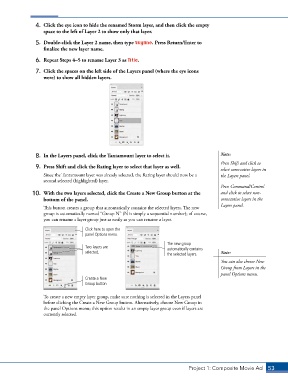
                   This button creates a group that automatically contains the selected layers. The new
                   group is automatically named “Group N” (N is simply a sequential number); of course,
                   you can rename a layer group just as easily as you can rename a layer.
                                    Click here to open the
                                    panel Options menu.
                                                                      The new group
                                    Two layers are                    automatically contains
                                    selected.                         the selected layers.  Note:
                                                                                            You can also choose New
                                                                                            Group from Layers in the
                                                                                            panel Options menu.
                                    Create a New
                                    Group button


                   To create a new empty layer group, make sure nothing is selected in the Layers panel
                   before clicking the Create a New Group button. Alternatively, choose New Group in
                   the panel Options menu; this option results in an empty layer group even if layers are
                   currently selected.


                                                                               Project 1: Composite Movie Ad    53

