


Page 40 - CC2017_PS_Look_Inside
P. 40
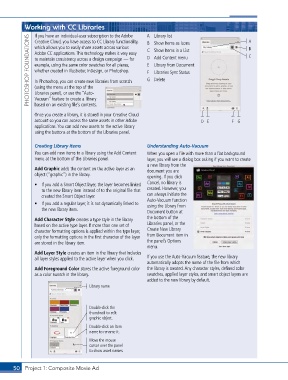
Working with CC Libraries                          A  Library list                           A
               If you have an individual-user subscription to the Adobe
             PHOTOSHOP FOUNDATIONS  Adobe CC applications. This technology makes it very easy   C  Show Items in a List  C
               Creative Cloud, you have access to CC Library functionality,
                                                              B  Show Items as Icons
               which allows you to easily share assets across various
                                                                                                        B
                                                              D  Add Content menu
               to maintain consistency across a design campaign — for
                                                              E  Library from Document
               example, using the same color swatches for all pieces,
               whether created in Illustrator, InDesign, or Photoshop.
                                                              F  Libraries Sync Status
                                                              G  Delete
               In Photoshop, you can create new libraries from scratch
               (using the menu at the top of the
               Libraries panel), or use the “Auto-
               Vacuum” feature to create a library
               based on an existing file’s contents.

               Once you create a library, it is stored in your Creative Cloud
               account so you can access the same assets in other Adobe             D E          F G
               applications. You can add new assets to the active library
               using the buttons at the bottom of the Libraries panel.


               Creating Library Items                         Understanding Auto-Vacuum
               You can add new items to a library using the Add Content   When you open a file with more than a flat background
               menu at the bottom of the Libraries panel.     layer, you will see a dialog box asking if you want to create
                                                              a new library from the
               Add Graphic adds the content on the active layer as an   document you are
               object (“graphic”) in the library.             opening. If you click

               •  If you add a Smart Object layer, the layer becomes linked   Cancel, no library is
                  to the new library item instead of to the original file that   created. However, you
                  created the Smart Object layer.             can always initiate the
                                                              Auto-Vacuum function
               •  If you add a regular layer, it is not dynamically linked to   using the Library from
                  the new library item.
                                                              Document button at
               Add Character Style creates a type style in the library   the bottom of the
               based on the active type layer. If more than one set of   Libraries panel, or the
               character formatting options is applied within the type layer,   Create New Library
               only the formatting options in the first character of the layer   from Document item in
               are stored in the library item.                the panel’s Options
                                                              menu.
               Add Layer Style creates an item in the library that includes
               all layer styles applied to the active layer when you click.  If you use the Auto-Vacuum feature, the new library
                                                              automatically adopts the name of the file from which
               Add Foreground Color stores the active foreground color   the library is created. Any character styles, defined color
               as a color swatch in the library.              swatches, applied layer styles, and smart object layers are
                                                              added to the new library by default.
                                      Library name


                                      Double-click the
                                      thumbnail to edit
                                      graphic object.
                                      Double-click an item
                                      name to rename it.
                                      Move the mouse
                                      cursor over the panel
                                      to show asset names.


       50 Project 1: Composite Movie Ad

