


Page 60 - Adobe Photoshop 2022
P. 60
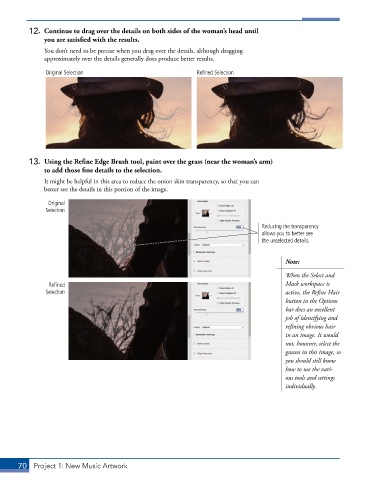
12.  Continue to drag over the details on both sides of the woman’s head until
              you are satisfied with the results.
               You don’t need to be precise when you drag over the details, although dragging
               approximately over the details generally does produce better results.

               Original Selection                            Refined Selection


          13.  Using the Refine Edge Brush tool, paint over the grass (near the woman’s arm)
              to add those fine details to the selection.
               It might be helpful in this area to reduce the onion skin transparency, so that you can
               better see the details in this portion of the image.

                Original
               Selection

                                                                                 Reducing the transparency
                                                                                 allows you to better see
                                                                                 the unselected details.


                                                                                        Note:

                                                                                        When the Select and
                Refined                                                                 Mask workspace is
               Selection                                                                active, the Refine Hair
                                                                                        button in the Options
                                                                                        bar does an excellent
                                                                                        job of identifying and
                                                                                        refining obvious hair
                                                                                        in an image. It would
                                                                                        not, however, select the
                                                                                        grasses in this image, so
                                                                                        you should still know
                                                                                        how to use the vari-
                                                                                        ous tools and settings
                                                                                        individually.


       70  Project 1: New Music Artwork

